Module 8 - Considering the Seeing Reason Tool for Your Project
Activity 8.3
Step 2: Reviewing Learner Work
Follow the steps below to practice reviewing a learner causal map.
If you have logged out as a teacher, go to the Seeing Reason Teacher Workspace at www.intel.com/education/seeingreason. Click Enter and then log in by clicking on Teacher Workspace. If you are still logged in as a teacher, start at direction number 3 below.
-
Review your sample team’s work. The team’s most recent map is displayed by default.
Caution: In this review mode, the maps you view are fully functional. Any changes you make will be reflected in the learners' map.
Scroll down to the Comments section that appears below the map. Click in the Add a New Comment section and then enter your comments to the team.
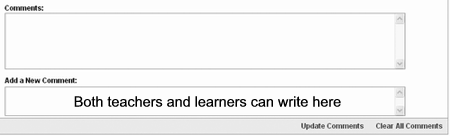
| Note: All comments are saved sequentially, with the most recent one at the top. |
-
Click Update Comments when done. All comments are saved sequentially, with the most recent one at the top.
To see how the team’s thoughts have evolved through the project, scroll down to see the View or Print Team’s Map choices.
- Select the type of map to view, then click Go. In addition to displaying the map itself, the learners’ description of the factors and the relationships will also appear. You can also delete selected or all learner maps for this team.

| Note: If you have a pop-up blocker, you will need to turn it off for this feature to work. Another way to override your pop-up blocker is to hold down the Ctrl key as you click Go. |
Most recent map displays the most recent map and the descriptions of the factors and relationships.
Select maps to view or print shows small images of the saved maps. You can choose the individual map you want to view. You may only want to view or print the maps where significant changes were made.

-
All maps for this team shows all the maps and the descriptions of the relationships.
- Maps in Portfolio takes you to the maps the learners have put into their portfolio.
9... Print any or all maps using the print button of the Internet browser.

