Use PowerPoint online to display and even embed your students creative writing…

Submitted by Fiona Beal

One Drive is a free Microsoft application that gives you free access to a range of Microsoft Office products. Have you registered for One Drive? https://onedrive.live.com You’ll receive 5GB of free storage.

I discovered recently that it is a great way to display students’ stories (or whaever else) that are written in PowerPoint,  online by uploading them to PowerPoint online in Microsoft. I tried this out with a Grade 2 class.  There is a wonderful Literacy site called Communication for All that has a great array of downloadable PowerPoint templates that Foundation Phase students love using on one of its pages. Take a look at http://www.communication4all.co.uk/http/StoryMaker.htm.   The PowerPoints provide art with them. Here is an example of one of the templates:

My Grade 2 class chose this Easter template to write on:

How to upload a PowerPoint to One Drive

1. Log in to One Drive: https://onedrive.live.com

2. Click on Upload/Files
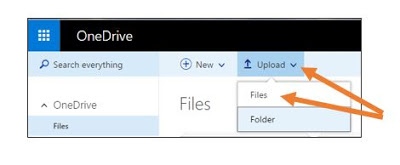
3. Locate your PowerPoint and upload it to One Drive.

4. Share it so that anyone with the link can view it.

First click on Get a link, then select View only and finally create the link.

5. You may wish to also embed the Powerpoint stories on a class blog or a website click on the three dots and then select embed:

6. Copy the provided code and select the smallest dimension for a blog

I uploaded two of the completed stories to Microsoft One Drive following these instructions and here are the results:

-1- Caleb’s ‘Easter Time’

-11- Caden’s ‘The Egg Hunt’

Microsoft’s One Drive is amazing!  For more lessons on how to use Microsoft in the classroom visit the Microsoft Educator Community  at:  https://education.microsoft.com/  and go to the Lessons page where you can search thousands of lesson plans created by educators for educators to help enhance teaching and learning. 

« Return to Latest News

SchoolNet South Africa is an incorporated Non Profit Company - Registration 2001/012244/08, NPO Number 030-817
and holds Public Benefit Organisation (PBO) Status, in terms of Section 30 of the Income Tax Act - PBO Number 130003557.

Click here to support SchoolNet


/*; } .etn-event-item .etn-event-category span, .etn-btn, .attr-btn-primary, .etn-attendee-form .etn-btn, .etn-ticket-widget .etn-btn, .schedule-list-1 .schedule-header, .speaker-style4 .etn-speaker-content .etn-title a, .etn-speaker-details3 .speaker-title-info, .etn-event-slider .swiper-pagination-bullet, .etn-speaker-slider .swiper-pagination-bullet, .etn-event-slider .swiper-button-next, .etn-event-slider .swiper-button-prev, .etn-speaker-slider .swiper-button-next, .etn-speaker-slider .swiper-button-prev, .etn-single-speaker-item .etn-speaker-thumb .etn-speakers-social a, .etn-event-header .etn-event-countdown-wrap .etn-count-item, .schedule-tab-1 .etn-nav li a.etn-active, .schedule-list-wrapper .schedule-listing.multi-schedule-list .schedule-slot-time, .etn-speaker-item.style-3 .etn-speaker-content .etn-speakers-social a, .event-tab-wrapper ul li a.etn-tab-a.etn-active, .etn-btn, button.etn-btn.etn-btn-primary, .etn-schedule-style-3 ul li:before, .etn-zoom-btn, .cat-radio-btn-list [type=radio]:checked+label:after, .cat-radio-btn-list [type=radio]:not(:checked)+label:after, .etn-default-calendar-style .fc-button:hover, .etn-default-calendar-style .fc-state-highlight, .etn-calender-list a:hover, .events_calendar_standard .cat-dropdown-list select, .etn-event-banner-wrap, .events_calendar_list .calendar-event-details .calendar-event-content .calendar-event-category-wrap .etn-event-category, .etn-variable-ticket-widget .etn-add-to-cart-block, .etn-recurring-event-wrapper #seeMore, .more-event-tag, .etn-settings-dashboard .button-primary{ background-color:









