 Open Office Calc - Absolute Values
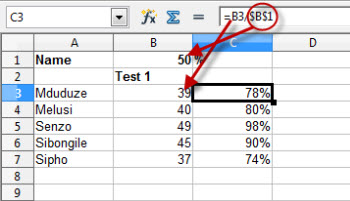
 | 1 | When you copy a formula like =C3/B1 from Row 3 to Row 4, the row indicators (3 and 1) in the formula change automatically, so that the copied formula would then be =C4/B2 Similarly if you copy a formula from Column B to Column C, the column indicator (B) in the formula changes to C. We want the value in row B to be constantly divided by B1 - it must remain unchanged. If you want to prevent this column or row change from happening, you should place a $ sign in front of the row or columns indicator. e.g. If you want B1 to remain unchanged, the formula should be written as =B5/$B$1 (see diagram). i.e. neither B nor1 must change as the formula is copied. |
 |
Produced by SchoolNet SA