|
Getting Started - continued
Step 3: Considering My Role as Curriculum Designer
Read more about your role as curriculum designer... (optional)
Step 4: Creating a Portfolio Folder
- To help you organize your Project Portfolio, you create a main folder, referred to as the Portfolio folder, and subfolders in the main folder. Examine the portfolio structure below.
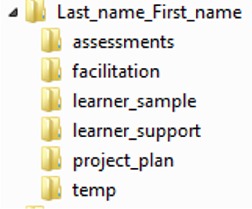
- Create the folder structure on your desktop. Use the Help Guide if you need help
creating folders and subfolders.
- A helps you keep track of your completed Portfolio elements.
Step 5: Viewing the Project Plan Template
- View the in detail and save it in the temp_folder in your Portfolio folder.
- The shows you how the various modules in the course are addressed in the project plan.
 Classroom Tip: Giving learners specific folder structures in which to save their files models an effective classroom management technique. This allows you and your learners to store and retrieve saved work in a logical and efficient manner. Classroom Tip: Giving learners specific folder structures in which to save their files models an effective classroom management technique. This allows you and your learners to store and retrieve saved work in a logical and efficient manner.
 Note: When you are looking for technical help during this course, you can use the Intel® Help Guide. This digital resource provides step-by-step directions for
completing ICT skills. Note: When you are looking for technical help during this course, you can use the Intel® Help Guide. This digital resource provides step-by-step directions for
completing ICT skills.
|

