in the Classroom

In this lesson we will use our TPACK knowledge to consider the options for using digital content resources in teaching and learning. We have many decisions to make AFTER we have made sure that the digital resource meets your curriculum needs and is suitable for your learners:
Neither option is wrong. Where along this sliding scale would you place the approach of your lesson?
B - When do we use the resource? (related to purpose) All options are valid depending on your purpose. Where on this time scale would you place the use of digital content in your lesson?
C - What will be the impact on learning? Are you aware of how the use of technology and/or digital content is impacting on the learning experience? Which level of impact on learning best describes your lesson?
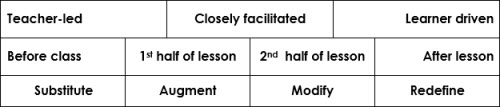
Let's call this our Decision-Making Grid (DMG) and combine the three scales into one grid as follows:
Activity 1.1 1. As a class review the scenario and discuss the questions. 2. Feed back to the whole group discussion.
Activity 1.2 - Understanding the didactic approach options Gather in small groups and each group discuss ONE these questions:
Record your responses in point form using the collaborative document online (or other suitable documenting method). Click here to see the Group 1 collaborative document online. Click here to see the Group 2 collaborative document online. Click here to see the Group 3 collaborative document online. How to create your own OneDrive collaborative document.
B - When do we use the resource? (related to purpose) Let's look at the three options and the possible purposes that could be served by using digital content at each stage. Activity 1.3 Working in the same three groups, work on ONE of the three options and complete the collaborative table by adding the purpose(s) that the teacher could have in mind in each case.
Click here to see the collaborative table online.
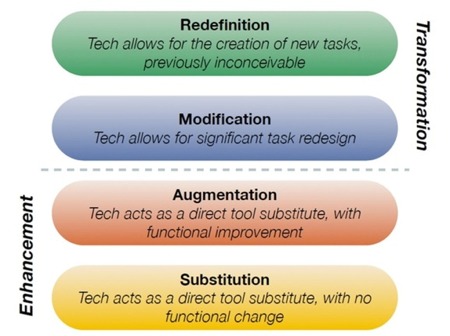
C - What will be the impact on learning? The impact of technology and digital resources on learning is commonly considered using the SAMR model.
Activity 1.4 1. Find words in your home language to replace the four keywords in this model. 2. Read this illustration of the model in terms of digital content use:
3. Try to find examples in your own subject that would illustrate this model. |
||||||||
| Proceed to Lesson 2 |