Submitted by Fiona Beal
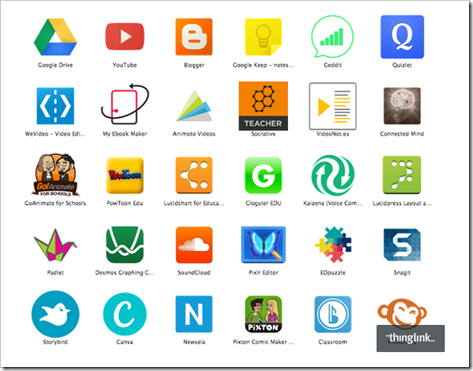
One of the great things about using Google Drive and in partivular the Google Chrome browser, is that the list of education apps that integrate with Google Drive is growing daily. These apps are available from the Chrome webstore. They make a Chromebook really come alive in a classroom setting.
Holly Clark writes a lot about the Chromebook so I thought I would make a start by installing the apps she suggests for the Chromebook in her blog post ‘Chrome Apps perfect for th...
Submitted by Fiona Beal
Now that I have started using a Chromebook I keep seeing great articles about them on the web. One of the best ways to keep a record of those articles is to create a board in Pinterest and store all the wonderful sites you come across. I did just that! Click on the image below to be taken to the Pinterest board entitled ‘Çhromebook posts’.
...
Submitted by Fiona Beal
I started to look for some tutorials on using Chromebooks and came across this fantastic collection of three tutorials shared via a Thinglink interactive image! (Note to self: must make much greater use of Thinglink). These are tutorials provided by the ICT Co-ordinator at a school known as Saddleback. They are provided in three levels – beginner, intermediate and advanced – each with its own test and certificate. Click on the image below to be taken to th...
Submitted by Fiona Beal
Last week I was kindly loaned a Chromebook by Alister Payne, Deputy Principal at WPPS school in Cape Town. (Their school is planning to use Chromebooks throughout). Great excitement! These devices are currently not readily available in South Africa…but the first consignments are on their way! I had the privilege of using a Chromebook at the Google Teacher Academy in New York in 2012 and was impressed with its immediate start up speed in less than 10 seconds, it’s 8 hour ba...
The Microsoft in Education Global Forum is taking place in Redmond, Washington in March 2015. If you think you’ve got what it takes to be recognised as a Microsoft Innovative Educator, join the Microsoft Educator Network and upload a learning activity that demonstrates how you are using 21st century teaching practices in your classroom by 24 October 2014
Microsoft believes that technology alone cannot build 21st century skills for students. Technology is an accelerator, but alone it does not enable ...
What are you doing on Tuesday afternoon from 2:30 – 3:30pm? Why not join the Doodle 4 Google team at Western Province Preparatory School in Cape Town? A letter from the team follows:
Dear Principals and Teachers
Google South Africa invites you to join us for an afternoon of technology and creativity.
Where: Western Province Preparatory School, Centenary Pavilion, Upstairs, 49 Newlands Road, Claremont. Street parking available on Eyton Road or surrounds
When: Tuesday, 16th September 2...
Recently several really exciting competitions, both local and international, being announced with great prizes. Here they are gathered together in one post. Think about entering!
LOCAL COMPETITIONS
1. Microsoft Innovative Educator
http://goo.gl/PAsOJx Closing date for South Africa 15th October
The Microsoft in Education Global Forum taking place in Redmond, Washington in March 2015. If you think you’ve got what it takes to be recognised as a Microsoft Innovative Educator, join the Microsoft Edu...
Most of our South African learners do not have access to computers however many of them DO have access to a mobile phone. This free Nokia MoMaths initiative gives Grade 10-12 learners the opportunity to study mathematics anywhere and anytime, which in turn gives them the chance to empower themselves.
Students who sign up can access the mobile maths program for FREE whenever they like. Results have shown the collaborative networking format of the maths application on MXit encourages the children t...
Submitted by Fiona Beal
Have you ever downloaded a recommended application from the Internet and in so doing downloaded some unwanted third party software as well? Yes? It happens to us all at some time or other I think. It happened to me yesterday on my Windows laptop!
Yesterday I put out a tweet about a useful application program that I had discovered and liked, and someone replied mentioning a similar application that they use successfully. So, of course, I decided to download their recommended ...
From your Office 365 dashboard, select users and groups from the menu on the left side of the screen.
This will bring up your list of active users.
Go to the four icons above Display name and click on the second icon from the left.
This gives you the option to select your .csv file for uploading. If you don’t have one, you now have the option to download a blank copy for completion.
The screen will look like this
Your .csv file is an Excel spreadsheet that must be in a particular format ...
SchoolNet South Africa is an incorporated Non Profit Company - Registration 2001/012244/08, NPO Number 030-817
and holds Public Benefit Organisation (PBO) Status, in terms of Section 30 of the Income Tax Act - PBO Number 130003557.

 Submitted by Fiona Beal
One of the great things about using Google Drive and in partivular the Google Chrome browser, is that the list of education apps that integrate with Google Drive is growing daily. These apps are available from the Chrome webstore. They make a Chromebook really come alive in a classroom setting.
Holly Clark writes a lot about the Chromebook so I thought I would make a start by installing the apps she suggests for the Chromebook in her blog post ‘Chrome Apps perfect for th...
Submitted by Fiona Beal
One of the great things about using Google Drive and in partivular the Google Chrome browser, is that the list of education apps that integrate with Google Drive is growing daily. These apps are available from the Chrome webstore. They make a Chromebook really come alive in a classroom setting.
Holly Clark writes a lot about the Chromebook so I thought I would make a start by installing the apps she suggests for the Chromebook in her blog post ‘Chrome Apps perfect for th...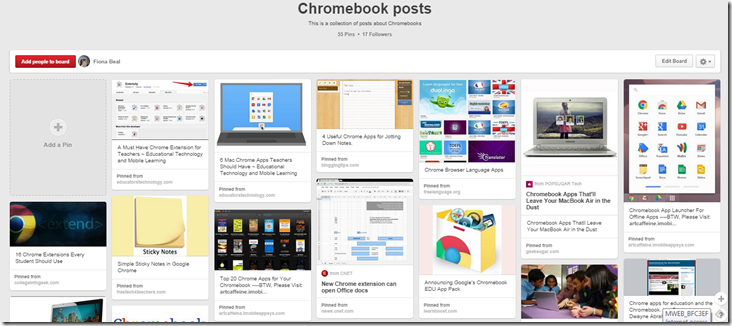 Submitted by Fiona Beal
Now that I have started using a Chromebook I keep seeing great articles about them on the web. One of the best ways to keep a record of those articles is to create a board in Pinterest and store all the wonderful sites you come across. I did just that! Click on the image below to be taken to the Pinterest board entitled ‘Çhromebook posts’.
...
Submitted by Fiona Beal
Now that I have started using a Chromebook I keep seeing great articles about them on the web. One of the best ways to keep a record of those articles is to create a board in Pinterest and store all the wonderful sites you come across. I did just that! Click on the image below to be taken to the Pinterest board entitled ‘Çhromebook posts’.
... Submitted by Fiona Beal
I started to look for some tutorials on using Chromebooks and came across this fantastic collection of three tutorials shared via a Thinglink interactive image! (Note to self: must make much greater use of Thinglink). These are tutorials provided by the ICT Co-ordinator at a school known as Saddleback. They are provided in three levels – beginner, intermediate and advanced – each with its own test and certificate. Click on the image below to be taken to th...
Submitted by Fiona Beal
I started to look for some tutorials on using Chromebooks and came across this fantastic collection of three tutorials shared via a Thinglink interactive image! (Note to self: must make much greater use of Thinglink). These are tutorials provided by the ICT Co-ordinator at a school known as Saddleback. They are provided in three levels – beginner, intermediate and advanced – each with its own test and certificate. Click on the image below to be taken to th... Submitted by Fiona Beal
Last week I was kindly loaned a Chromebook by Alister Payne, Deputy Principal at WPPS school in Cape Town. (Their school is planning to use Chromebooks throughout). Great excitement! These devices are currently not readily available in South Africa…but the first consignments are on their way! I had the privilege of using a Chromebook at the Google Teacher Academy in New York in 2012 and was impressed with its immediate start up speed in less than 10 seconds, it’s 8 hour ba...
Submitted by Fiona Beal
Last week I was kindly loaned a Chromebook by Alister Payne, Deputy Principal at WPPS school in Cape Town. (Their school is planning to use Chromebooks throughout). Great excitement! These devices are currently not readily available in South Africa…but the first consignments are on their way! I had the privilege of using a Chromebook at the Google Teacher Academy in New York in 2012 and was impressed with its immediate start up speed in less than 10 seconds, it’s 8 hour ba... The Microsoft in Education Global Forum is taking place in Redmond, Washington in March 2015. If you think you’ve got what it takes to be recognised as a Microsoft Innovative Educator, join the Microsoft Educator Network and upload a learning activity that demonstrates how you are using 21st century teaching practices in your classroom by 24 October 2014
Microsoft believes that technology alone cannot build 21st century skills for students. Technology is an accelerator, but alone it does not enable ...
The Microsoft in Education Global Forum is taking place in Redmond, Washington in March 2015. If you think you’ve got what it takes to be recognised as a Microsoft Innovative Educator, join the Microsoft Educator Network and upload a learning activity that demonstrates how you are using 21st century teaching practices in your classroom by 24 October 2014
Microsoft believes that technology alone cannot build 21st century skills for students. Technology is an accelerator, but alone it does not enable ... What are you doing on Tuesday afternoon from 2:30 – 3:30pm? Why not join the Doodle 4 Google team at Western Province Preparatory School in Cape Town? A letter from the team follows:
Dear Principals and Teachers
Google South Africa invites you to join us for an afternoon of technology and creativity.
Where: Western Province Preparatory School, Centenary Pavilion, Upstairs, 49 Newlands Road, Claremont. Street parking available on Eyton Road or surrounds
When: Tuesday, 16th September 2...
What are you doing on Tuesday afternoon from 2:30 – 3:30pm? Why not join the Doodle 4 Google team at Western Province Preparatory School in Cape Town? A letter from the team follows:
Dear Principals and Teachers
Google South Africa invites you to join us for an afternoon of technology and creativity.
Where: Western Province Preparatory School, Centenary Pavilion, Upstairs, 49 Newlands Road, Claremont. Street parking available on Eyton Road or surrounds
When: Tuesday, 16th September 2... Recently several really exciting competitions, both local and international, being announced with great prizes. Here they are gathered together in one post. Think about entering!
LOCAL COMPETITIONS
1. Microsoft Innovative Educator
http://goo.gl/PAsOJx Closing date for South Africa 15th October
The Microsoft in Education Global Forum taking place in Redmond, Washington in March 2015. If you think you’ve got what it takes to be recognised as a Microsoft Innovative Educator, join the Microsoft Edu...
Recently several really exciting competitions, both local and international, being announced with great prizes. Here they are gathered together in one post. Think about entering!
LOCAL COMPETITIONS
1. Microsoft Innovative Educator
http://goo.gl/PAsOJx Closing date for South Africa 15th October
The Microsoft in Education Global Forum taking place in Redmond, Washington in March 2015. If you think you’ve got what it takes to be recognised as a Microsoft Innovative Educator, join the Microsoft Edu...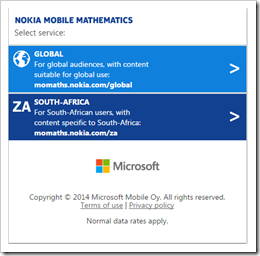 Most of our South African learners do not have access to computers however many of them DO have access to a mobile phone. This free Nokia MoMaths initiative gives Grade 10-12 learners the opportunity to study mathematics anywhere and anytime, which in turn gives them the chance to empower themselves.
Students who sign up can access the mobile maths program for FREE whenever they like. Results have shown the collaborative networking format of the maths application on MXit encourages the children t...
Most of our South African learners do not have access to computers however many of them DO have access to a mobile phone. This free Nokia MoMaths initiative gives Grade 10-12 learners the opportunity to study mathematics anywhere and anytime, which in turn gives them the chance to empower themselves.
Students who sign up can access the mobile maths program for FREE whenever they like. Results have shown the collaborative networking format of the maths application on MXit encourages the children t... Submitted by Fiona Beal
Have you ever downloaded a recommended application from the Internet and in so doing downloaded some unwanted third party software as well? Yes? It happens to us all at some time or other I think. It happened to me yesterday on my Windows laptop!
Yesterday I put out a tweet about a useful application program that I had discovered and liked, and someone replied mentioning a similar application that they use successfully. So, of course, I decided to download their recommended ...
Submitted by Fiona Beal
Have you ever downloaded a recommended application from the Internet and in so doing downloaded some unwanted third party software as well? Yes? It happens to us all at some time or other I think. It happened to me yesterday on my Windows laptop!
Yesterday I put out a tweet about a useful application program that I had discovered and liked, and someone replied mentioning a similar application that they use successfully. So, of course, I decided to download their recommended ... From your Office 365 dashboard, select users and groups from the menu on the left side of the screen.
This will bring up your list of active users.
Go to the four icons above Display name and click on the second icon from the left.
This gives you the option to select your .csv file for uploading. If you don’t have one, you now have the option to download a blank copy for completion.
The screen will look like this
Your .csv file is an Excel spreadsheet that must be in a particular format ...
From your Office 365 dashboard, select users and groups from the menu on the left side of the screen.
This will bring up your list of active users.
Go to the four icons above Display name and click on the second icon from the left.
This gives you the option to select your .csv file for uploading. If you don’t have one, you now have the option to download a blank copy for completion.
The screen will look like this
Your .csv file is an Excel spreadsheet that must be in a particular format ...























