The Microsoft in Education Global Forum taking place in Redmond, Washington in March 2015. If you think you’ve got what it takes to be recognised as a Microsoft Innovative Educator, join the Microsoft Educator Network and upload a learning activity that demonstrates how you are using 21st century teaching practices in your classroom by 15 October 2014
Microsoft believes that technology alone cannot build 21st century skills for students. Technology is an accelerator, but alone it does not enable ch...
Submitted by Fiona Beal
These are free Web2.0 applications for uploading a presentation to the web so that it can be viewed online.
A. SlideShare (http://www.slideshare.net/)
SlideShare is the world’s largest and leading online community for hosting, discovering and sharing presentations. It is safe to say that SlideShare has become a must-have tool in every presenter’s toolbox today. Business professionals, teachers, public speakers and students alike often use it to find inspiration and ideas, l...
Microsoft in Education in South Africa has created a fantastic and comprehensive collection of resources that can help anyone understand and explore the possibilities that Office 365 offers.
This post was first posted on:
http://blogs.msdn.com/b/ukschools/archive/2014/08/04/microsoft-in-education-office-365-guides-and-scenarios.aspx
http://blogs.msdn.com/b/teachers/archive/2014/08/04/microsoft-in-education-office-365-guides-and-scenarios-for-schools.aspx
If you have access to Office 365 ind...
This is another guest post from Anthony Peters @apeters522 who is an innovative English teacher from Parklands College in Cape Town. In previous posts Anthony shared his very successful Shakespeare QR code Scavenger Hunt Assessment activity done with Grade 9 students, as well as Awesome Aurasma – teaching the different forms of humour to a Grade 9 class using Aurasma, ‘Vivacious Visual Literacy!’ An innovative assessment task for Grade 9 Visual Literacy and his innovative celebration ...
Submitted by Fiona Beal
At the Google in Education Summit held at Dainfern College in Johannesburg in July an exciting new venture was launched by Google in South Africa – Google Education Groups. You can find out more about Google Educator Groups (GEGs) in general at this URL: http://www.google.com/landing/geg/ This is a world-wide launch with each country having its own GEGs We invite you to join GEG South Africa. This announcement was received with great excitement at the Summit.
What a...
Are you a teacher that likes to use the media with your 13-19 year old students? If so, please think about joining our upcoming Adobe Youth Voices programme with a group of students – even if you need to form an after school club in order to do this. The great thing about it is that you’ll learn to create media with the free products and free online training from Adobe headquarters that we supply. All teachers and learners who meet all expectations will go into a prize draw to win gr...
If you are a Maths teacher for Grade 10-12 Maths, you probably know about Nokia’s free Momaths service for Grade 10 – 12 students that is available on a smartphone – a device which many students of that age have access to. Today I thought I would investigate whether this service also works on a PC. And it does! here were the steps I followed.
1. Go to the Nokia Momaths website
The website URL is https://momaths.nokia.com. The Nokia application gives two options – one for South Africa ...
Submitted by Fiona Beal
Here are some suggestions for illustrating stories that you have written or that your class has written.
1. Hand drawn pictures
Hand drawn with kokis or pencil crayons and scanned into the computer.
Example: A noise in the night
2. Use cutouts
Create a background in some way. Then cut out figures and objects and place them on the background. Take a photo. Then for the next page move them around again and take another photo.
Example: Emily and the Seagull
3. Take photos
...
Submitted by Fiona Beal
If we want to use already created clipart images to create a story we will need to be looking mainly for royalty free images. Here is a collection of resources to peruse.
Larry Ferlazzo is a great curator of the web – he has a whole list of ‘Best of series…” sites which you can find here. So here are Larry Ferlazzo’s picks for The Best Online Sources For Images (not in order of preference). I think it is best to go for royaltry free/public domain pics.
Here’s ...
If you are a Grade 10 – 12 Maths teacher here are some important questions we’d like to ask you.
Do your students need more help than what you are able to provide for them at school?
Do you wish you knew of some free after hours Maths tuition for your students?
Would you like your students to enjoy 24/7 free access to maths tuition via their phones out of school hours?
The Nokia MoMaths project is a great example of using mobile technologies to support learning of Grade 10 – 12 mathematics in S...
SchoolNet South Africa is an incorporated Non Profit Company - Registration 2001/012244/08, NPO Number 030-817
and holds Public Benefit Organisation (PBO) Status, in terms of Section 30 of the Income Tax Act - PBO Number 130003557.

 The Microsoft in Education Global Forum taking place in Redmond, Washington in March 2015. If you think you’ve got what it takes to be recognised as a Microsoft Innovative Educator, join the Microsoft Educator Network and upload a learning activity that demonstrates how you are using 21st century teaching practices in your classroom by 15 October 2014
Microsoft believes that technology alone cannot build 21st century skills for students. Technology is an accelerator, but alone it does not enable ch...
The Microsoft in Education Global Forum taking place in Redmond, Washington in March 2015. If you think you’ve got what it takes to be recognised as a Microsoft Innovative Educator, join the Microsoft Educator Network and upload a learning activity that demonstrates how you are using 21st century teaching practices in your classroom by 15 October 2014
Microsoft believes that technology alone cannot build 21st century skills for students. Technology is an accelerator, but alone it does not enable ch... Submitted by Fiona Beal
These are free Web2.0 applications for uploading a presentation to the web so that it can be viewed online.
A. SlideShare (http://www.slideshare.net/)
SlideShare is the world’s largest and leading online community for hosting, discovering and sharing presentations. It is safe to say that SlideShare has become a must-have tool in every presenter’s toolbox today. Business professionals, teachers, public speakers and students alike often use it to find inspiration and ideas, l...
Submitted by Fiona Beal
These are free Web2.0 applications for uploading a presentation to the web so that it can be viewed online.
A. SlideShare (http://www.slideshare.net/)
SlideShare is the world’s largest and leading online community for hosting, discovering and sharing presentations. It is safe to say that SlideShare has become a must-have tool in every presenter’s toolbox today. Business professionals, teachers, public speakers and students alike often use it to find inspiration and ideas, l... Microsoft in Education in South Africa has created a fantastic and comprehensive collection of resources that can help anyone understand and explore the possibilities that Office 365 offers.
This post was first posted on:
http://blogs.msdn.com/b/ukschools/archive/2014/08/04/microsoft-in-education-office-365-guides-and-scenarios.aspx
http://blogs.msdn.com/b/teachers/archive/2014/08/04/microsoft-in-education-office-365-guides-and-scenarios-for-schools.aspx
If you have access to Office 365 ind...
Microsoft in Education in South Africa has created a fantastic and comprehensive collection of resources that can help anyone understand and explore the possibilities that Office 365 offers.
This post was first posted on:
http://blogs.msdn.com/b/ukschools/archive/2014/08/04/microsoft-in-education-office-365-guides-and-scenarios.aspx
http://blogs.msdn.com/b/teachers/archive/2014/08/04/microsoft-in-education-office-365-guides-and-scenarios-for-schools.aspx
If you have access to Office 365 ind... This is another guest post from Anthony Peters @apeters522 who is an innovative English teacher from Parklands College in Cape Town. In previous posts Anthony shared his very successful Shakespeare QR code Scavenger Hunt Assessment activity done with Grade 9 students, as well as Awesome Aurasma – teaching the different forms of humour to a Grade 9 class using Aurasma, ‘Vivacious Visual Literacy!’ An innovative assessment task for Grade 9 Visual Literacy and his innovative celebration ...
 Submitted by Fiona Beal
At the Google in Education Summit held at Dainfern College in Johannesburg in July an exciting new venture was launched by Google in South Africa – Google Education Groups. You can find out more about Google Educator Groups (GEGs) in general at this URL: http://www.google.com/landing/geg/ This is a world-wide launch with each country having its own GEGs We invite you to join GEG South Africa. This announcement was received with great excitement at the Summit.
What a...
Submitted by Fiona Beal
At the Google in Education Summit held at Dainfern College in Johannesburg in July an exciting new venture was launched by Google in South Africa – Google Education Groups. You can find out more about Google Educator Groups (GEGs) in general at this URL: http://www.google.com/landing/geg/ This is a world-wide launch with each country having its own GEGs We invite you to join GEG South Africa. This announcement was received with great excitement at the Summit.
What a... Are you a teacher that likes to use the media with your 13-19 year old students? If so, please think about joining our upcoming Adobe Youth Voices programme with a group of students – even if you need to form an after school club in order to do this. The great thing about it is that you’ll learn to create media with the free products and free online training from Adobe headquarters that we supply. All teachers and learners who meet all expectations will go into a prize draw to win gr...
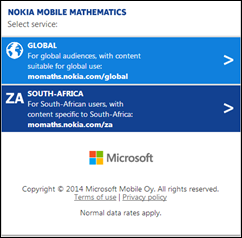 If you are a Maths teacher for Grade 10-12 Maths, you probably know about Nokia’s free Momaths service for Grade 10 – 12 students that is available on a smartphone – a device which many students of that age have access to. Today I thought I would investigate whether this service also works on a PC. And it does! here were the steps I followed.
1. Go to the Nokia Momaths website
The website URL is https://momaths.nokia.com. The Nokia application gives two options – one for South Africa ...
If you are a Maths teacher for Grade 10-12 Maths, you probably know about Nokia’s free Momaths service for Grade 10 – 12 students that is available on a smartphone – a device which many students of that age have access to. Today I thought I would investigate whether this service also works on a PC. And it does! here were the steps I followed.
1. Go to the Nokia Momaths website
The website URL is https://momaths.nokia.com. The Nokia application gives two options – one for South Africa ...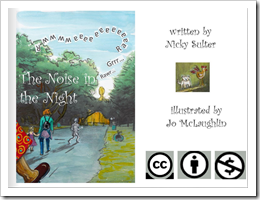 Submitted by Fiona Beal
Here are some suggestions for illustrating stories that you have written or that your class has written.
1. Hand drawn pictures
Hand drawn with kokis or pencil crayons and scanned into the computer.
Example: A noise in the night
2. Use cutouts
Create a background in some way. Then cut out figures and objects and place them on the background. Take a photo. Then for the next page move them around again and take another photo.
Example: Emily and the Seagull
3. Take photos
...
Submitted by Fiona Beal
Here are some suggestions for illustrating stories that you have written or that your class has written.
1. Hand drawn pictures
Hand drawn with kokis or pencil crayons and scanned into the computer.
Example: A noise in the night
2. Use cutouts
Create a background in some way. Then cut out figures and objects and place them on the background. Take a photo. Then for the next page move them around again and take another photo.
Example: Emily and the Seagull
3. Take photos
... Submitted by Fiona Beal
If we want to use already created clipart images to create a story we will need to be looking mainly for royalty free images. Here is a collection of resources to peruse.
Larry Ferlazzo is a great curator of the web – he has a whole list of ‘Best of series…” sites which you can find here. So here are Larry Ferlazzo’s picks for The Best Online Sources For Images (not in order of preference). I think it is best to go for royaltry free/public domain pics.
Here’s ...
Submitted by Fiona Beal
If we want to use already created clipart images to create a story we will need to be looking mainly for royalty free images. Here is a collection of resources to peruse.
Larry Ferlazzo is a great curator of the web – he has a whole list of ‘Best of series…” sites which you can find here. So here are Larry Ferlazzo’s picks for The Best Online Sources For Images (not in order of preference). I think it is best to go for royaltry free/public domain pics.
Here’s ...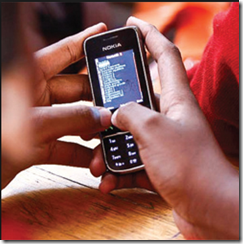 If you are a Grade 10 – 12 Maths teacher here are some important questions we’d like to ask you.
Do your students need more help than what you are able to provide for them at school?
Do you wish you knew of some free after hours Maths tuition for your students?
Would you like your students to enjoy 24/7 free access to maths tuition via their phones out of school hours?
The Nokia MoMaths project is a great example of using mobile technologies to support learning of Grade 10 – 12 mathematics in S...
If you are a Grade 10 – 12 Maths teacher here are some important questions we’d like to ask you.
Do your students need more help than what you are able to provide for them at school?
Do you wish you knew of some free after hours Maths tuition for your students?
Would you like your students to enjoy 24/7 free access to maths tuition via their phones out of school hours?
The Nokia MoMaths project is a great example of using mobile technologies to support learning of Grade 10 – 12 mathematics in S...























