Submitted by Fiona Beal
One often hears the words 21st century teacher bandied about today. What exactly does this term mean? Is the 21st century teacher any different from the 20th century teacher or the 19th century teacher? A quick Google search doesn’t throw very much light on 18th, 19th, or 20th century teaching but changing the search criteria to ‘21st century’ reveals PLENTY of resources – 21st-century school, 21st-century education, 21st-century teacher, 21st-century skill...
The Microsoft in Education team has some exciting news. They have launched a new community home: the Microsoft Educator Community. This new site is a central destination where one will have access to over 1.5 million educators around the world, a fresh selection of professional development courses and resources, thousands of inspiring lesson plans, and access to live lessons and virtual field trips.
The new community site is a combined experience of the ...
The Internet is currently full of posts about using Microsoft products effectively in the classroom. Here are a number of them from this past week:
Useful Microsoft posts #23
View more lists from Fiona Beal
...
Google Sites is a free website creation tool that connects really well with other GAFE tools if you are a GAFE school. It is very easy to use and students pick it up very quickly. You can select a template, embed different types of media and attach documents. You can connect to Google drive very easily. You can share the website with whoever you want to or make it public. If you don’t have GAFE at school you can make a Google site on your normal Gmail account by going to http;//sites.goog...
Creating a Google site is a simple affair but there is loads of help available from Google when you have a query. https://goo.gl/43eZvy
Here are some links to the various tips from Google Support:
Getting started
Creating a site
Site templates
Creating pages
Page templates
Different page types
See what admins can do with templates
Adding templates to the gallery
Page level permissions
Site permissions
Page hierarchy
Inserting media and other gadgets
Adding Images
Embedding calendars
Adding comments ...
If you are making a presentation using Google Slides, you will probably want to add a video from YouTube at some stage to illustrate a point. The question is – how does one do this?
1. Open your presentation and choose the video option in the Insert menu
The video insert link appears on your slide. Add your YouTube video URL and click on search
YouTube immediately locates the video and adds it to the slide
2. Click on the video thumbnail and choose select if it is the correct video....
I have only recently come across this free, webtool called Talktyper https://www.talktyper.com/. Admittedly one can now use Google Docs and the Chrome browser for dictation that types up your words, but what I like about Talktyper is that it works in any browser.
What is Talktyper?
It is a free speech to text dictation software that works in any browser.
How does it work?
All you have to do is open your browser and type in www.talktyper.com. When it opens click on the on-screen microphone...
This post is adapted from the report written by Janet Thomson, CEO of SchoolNet. The full report can be found on our website here https://goo.gl/Leh2In This post captures ten of the highlights from the report.
The Reading Association of South Africa and the Pan-African Reading for All Conference was held at the Baxter Theatre in Cape Town from 2nd – 5th September. The theme was Imagination and Literacy.
1. Opening plenary
Top: David Harrison at the Opening ...
The Internet is currently full of posts about using Microsoft products effectively in the classroom. Here are a number of them from this past week:Useful Microsoft posts #22
View more lists from Fiona Beal
...
We invite you to join us for the EdTechTeam’s iOS Summit on 8th October 2015 at Parklands College.The engaging experience includes an opening keynote, Apple Distinguished Educators, in-depth workshop sessions, and a wide variety of breakout sessions …all focused on the purposeful integration of the iPad for teaching and learning. The two key speakers are world-renowned presenters Jenny Magiera and Holly Clark. The program is available to view at https://goo.gl/Q2Hm3g. Register at http://za.io...
SchoolNet South Africa is an incorporated Non Profit Company - Registration 2001/012244/08, NPO Number 030-817
and holds Public Benefit Organisation (PBO) Status, in terms of Section 30 of the Income Tax Act - PBO Number 130003557.

 Submitted by Fiona Beal
One often hears the words 21st century teacher bandied about today. What exactly does this term mean? Is the 21st century teacher any different from the 20th century teacher or the 19th century teacher? A quick Google search doesn’t throw very much light on 18th, 19th, or 20th century teaching but changing the search criteria to ‘21st century’ reveals PLENTY of resources – 21st-century school, 21st-century education, 21st-century teacher, 21st-century skill...
Submitted by Fiona Beal
One often hears the words 21st century teacher bandied about today. What exactly does this term mean? Is the 21st century teacher any different from the 20th century teacher or the 19th century teacher? A quick Google search doesn’t throw very much light on 18th, 19th, or 20th century teaching but changing the search criteria to ‘21st century’ reveals PLENTY of resources – 21st-century school, 21st-century education, 21st-century teacher, 21st-century skill... The Microsoft in Education team has some exciting news. They have launched a new community home: the Microsoft Educator Community. This new site is a central destination where one will have access to over 1.5 million educators around the world, a fresh selection of professional development courses and resources, thousands of inspiring lesson plans, and access to live lessons and virtual field trips.
The new community site is a combined experience of the ...
The Microsoft in Education team has some exciting news. They have launched a new community home: the Microsoft Educator Community. This new site is a central destination where one will have access to over 1.5 million educators around the world, a fresh selection of professional development courses and resources, thousands of inspiring lesson plans, and access to live lessons and virtual field trips.
The new community site is a combined experience of the ... Google Sites is a free website creation tool that connects really well with other GAFE tools if you are a GAFE school. It is very easy to use and students pick it up very quickly. You can select a template, embed different types of media and attach documents. You can connect to Google drive very easily. You can share the website with whoever you want to or make it public. If you don’t have GAFE at school you can make a Google site on your normal Gmail account by going to http;//sites.goog...
 Creating a Google site is a simple affair but there is loads of help available from Google when you have a query. https://goo.gl/43eZvy
Here are some links to the various tips from Google Support:
Getting started
Creating a site
Site templates
Creating pages
Page templates
Different page types
See what admins can do with templates
Adding templates to the gallery
Page level permissions
Site permissions
Page hierarchy
Inserting media and other gadgets
Adding Images
Embedding calendars
Adding comments ...
Creating a Google site is a simple affair but there is loads of help available from Google when you have a query. https://goo.gl/43eZvy
Here are some links to the various tips from Google Support:
Getting started
Creating a site
Site templates
Creating pages
Page templates
Different page types
See what admins can do with templates
Adding templates to the gallery
Page level permissions
Site permissions
Page hierarchy
Inserting media and other gadgets
Adding Images
Embedding calendars
Adding comments ...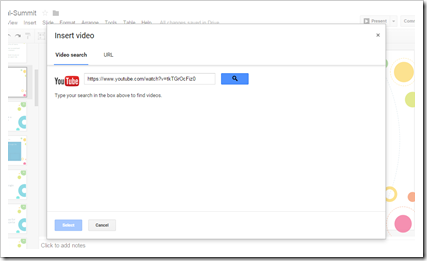 If you are making a presentation using Google Slides, you will probably want to add a video from YouTube at some stage to illustrate a point. The question is – how does one do this?
1. Open your presentation and choose the video option in the Insert menu
The video insert link appears on your slide. Add your YouTube video URL and click on search
YouTube immediately locates the video and adds it to the slide
2. Click on the video thumbnail and choose select if it is the correct video....
If you are making a presentation using Google Slides, you will probably want to add a video from YouTube at some stage to illustrate a point. The question is – how does one do this?
1. Open your presentation and choose the video option in the Insert menu
The video insert link appears on your slide. Add your YouTube video URL and click on search
YouTube immediately locates the video and adds it to the slide
2. Click on the video thumbnail and choose select if it is the correct video.... I have only recently come across this free, webtool called Talktyper https://www.talktyper.com/. Admittedly one can now use Google Docs and the Chrome browser for dictation that types up your words, but what I like about Talktyper is that it works in any browser.
What is Talktyper?
It is a free speech to text dictation software that works in any browser.
How does it work?
All you have to do is open your browser and type in www.talktyper.com. When it opens click on the on-screen microphone...
I have only recently come across this free, webtool called Talktyper https://www.talktyper.com/. Admittedly one can now use Google Docs and the Chrome browser for dictation that types up your words, but what I like about Talktyper is that it works in any browser.
What is Talktyper?
It is a free speech to text dictation software that works in any browser.
How does it work?
All you have to do is open your browser and type in www.talktyper.com. When it opens click on the on-screen microphone...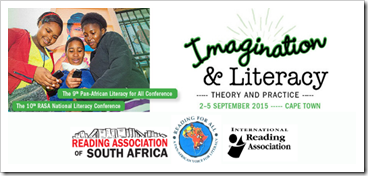 This post is adapted from the report written by Janet Thomson, CEO of SchoolNet. The full report can be found on our website here https://goo.gl/Leh2In This post captures ten of the highlights from the report.
The Reading Association of South Africa and the Pan-African Reading for All Conference was held at the Baxter Theatre in Cape Town from 2nd – 5th September. The theme was Imagination and Literacy.
1. Opening plenary
Top: David Harrison at the Opening ...
This post is adapted from the report written by Janet Thomson, CEO of SchoolNet. The full report can be found on our website here https://goo.gl/Leh2In This post captures ten of the highlights from the report.
The Reading Association of South Africa and the Pan-African Reading for All Conference was held at the Baxter Theatre in Cape Town from 2nd – 5th September. The theme was Imagination and Literacy.
1. Opening plenary
Top: David Harrison at the Opening ...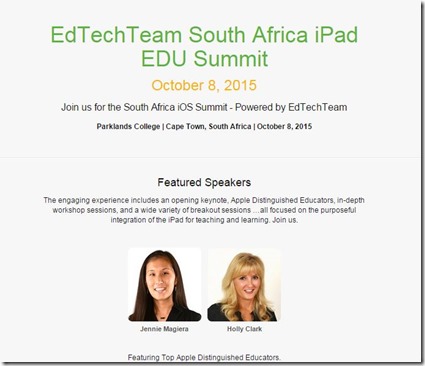 We invite you to join us for the EdTechTeam’s iOS Summit on 8th October 2015 at Parklands College.The engaging experience includes an opening keynote, Apple Distinguished Educators, in-depth workshop sessions, and a wide variety of breakout sessions …all focused on the purposeful integration of the iPad for teaching and learning. The two key speakers are world-renowned presenters Jenny Magiera and Holly Clark. The program is available to view at https://goo.gl/Q2Hm3g. Register at http://za.io...























