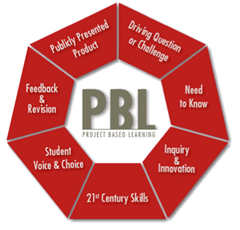
http://www.bie.org/about/what_is_pbl
Submitted by Fiona Beal
In this post we’ll go through the steps to implementing project-based learning in your classroom and then we’ll hear from an expert in designing projects – Michele Botha from Somerset House and see how she does it.
Introduction
The old-school model of passively learning facts and reciting or memorising them out of context is no longer sufficient to prepare our students to survive in today’s world with its complex pro...
Submitted by Fiona Beal
Somerset House is a really beautiful school in the Helderberg area of Somerset West. I have been wanting to visit Somerset House for such a long time as I have heard so much about the great things they are doing curriculum-wise. This is a school that is on the move! For example:
They have incorporated Bring Your Own Device into their Grade 6 and 7 classrooms in a very successful pilot. Michele Botha from Somerset West presented a webinar about this for SchoolNet. In fa...
On Tuesday afternoon (15th October) at 3.30pm we held a webinar entitled ‘Use Padlet and Linoit for collecting student responses’ presented by Fiona Beal. Thank you to all who attended the webinar.
Presentation
Fiona’s presentation is given below via Slideshare and you can download it should you wish to.
Use Padlet and Linoit to collect student responses from Fiona Beal
Summary of the webinar
Name: Use Padlet and Linoit for collecting student responses
Summary: This webinar takes a lo...
A linoit board is a virtual free bulletin board which can be populated with online stickies. These stickies can have resoeurces such as videos, weblinks and images added as well as text. You can organise the board in any way that you want. The board can be public or private and stickies can be moderated before being published by the creator. Only the creator of the board can delete stickies.
How to create a Linoit Board
My presentation on how to create a Linoit board
A tutorial
Here is a gre...
We are pleased to announce that we will be holding a webinar this week on Tuesday afternoon (15th October) at 3.30pm. Here are the details:
Name: Use Padlet and Linoit for collecting student responses
Summary: This webinar takes a look at two very useful, free webtools for recording student responses with no sign-in required by the students, namely Padlet and Linoit. The responses appear on the created board like online sticky notes. We will look at ways of using this tool in the classroom.
Presenter...
Submitted by Fiona Beal
Anthony Egbers, a very innovative technology co-ordinator from Dainfern College recently wrote a great post on his blog, entitled ‘10 things I will be taking from the za.gafesummit.com’ and he encouraged other South African teachers that attended the Summit to do likewise. Great idea, Anthony, I have taken the challenge!
The EdtechTeam’s Google Summits are enormously popular and are held all over the world sometimes twice in a week! This initiative of the EdTechTeam has ha...
Judi Francisco is a very creative technology co-ordinator from Micklefield Girls’ Primary School in Cape Town. I always like to keep my eye on her to see what she is up to next! (In fact I wrote a blogpost about the event she co-ordinated at Micklefield last year – “What a privilege to attend IT Design Week report back to parents at Micklefield Primary“) So when she invited me to visit her classroom on the last day of her Grade 6 flipped/blended classroom ‘JustBlendit’ project a c...
At the recent Google in Education Summit in Cape Town there were a number of presentations outlining the usefulness of Google Chrome as a browser option. Not only is it fast and reliable as a browser but it has a unique way of enabling almost everything that you want to do in your browsing session work right from the browser bar – by means of extensions. This is what my browser bar looks like currently and the list is growing.
Another unique feature in Chrome is that the Omnibox can be...
TeachMeets are a great way to be exposed to new webtools that other teachers are using successfully in their classrooms. We keep a record of these on the TeachMeet South Africa wiki http://teachmeet-southafrica.wikispaces.com/. This wiki also gives ideas on how you can start a teachMeet at your school.
What is a TeachMeet?
A tiny professional development “un-conference” where teachers get together to simply share ideas or lessons using ICT as a tool using different devices. If one can...
In the past I loved using Wallwisher for students to write responses to various questions in various lessons. The creators of Wallwisher recently felt that the name Wallwisher did not live up to their mission of having an online virtual surface that has all the benefits of being digital and the simplicity of a notepad. So the name was changed to Padlet (http://padlet.com)
Padlet can be described as an ‘online graffiti wall where teachers and students can have discussions, share web links, po...
SchoolNet South Africa is an incorporated Non Profit Company - Registration 2001/012244/08, NPO Number 030-817
and holds Public Benefit Organisation (PBO) Status, in terms of Section 30 of the Income Tax Act - PBO Number 130003557.

 http://www.bie.org/about/what_is_pbl
Submitted by Fiona Beal
In this post we’ll go through the steps to implementing project-based learning in your classroom and then we’ll hear from an expert in designing projects – Michele Botha from Somerset House and see how she does it.
Introduction
The old-school model of passively learning facts and reciting or memorising them out of context is no longer sufficient to prepare our students to survive in today’s world with its complex pro...
http://www.bie.org/about/what_is_pbl
Submitted by Fiona Beal
In this post we’ll go through the steps to implementing project-based learning in your classroom and then we’ll hear from an expert in designing projects – Michele Botha from Somerset House and see how she does it.
Introduction
The old-school model of passively learning facts and reciting or memorising them out of context is no longer sufficient to prepare our students to survive in today’s world with its complex pro... Submitted by Fiona Beal
Somerset House is a really beautiful school in the Helderberg area of Somerset West. I have been wanting to visit Somerset House for such a long time as I have heard so much about the great things they are doing curriculum-wise. This is a school that is on the move! For example:
They have incorporated Bring Your Own Device into their Grade 6 and 7 classrooms in a very successful pilot. Michele Botha from Somerset West presented a webinar about this for SchoolNet. In fa...
Submitted by Fiona Beal
Somerset House is a really beautiful school in the Helderberg area of Somerset West. I have been wanting to visit Somerset House for such a long time as I have heard so much about the great things they are doing curriculum-wise. This is a school that is on the move! For example:
They have incorporated Bring Your Own Device into their Grade 6 and 7 classrooms in a very successful pilot. Michele Botha from Somerset West presented a webinar about this for SchoolNet. In fa... On Tuesday afternoon (15th October) at 3.30pm we held a webinar entitled ‘Use Padlet and Linoit for collecting student responses’ presented by Fiona Beal. Thank you to all who attended the webinar.
Presentation
Fiona’s presentation is given below via Slideshare and you can download it should you wish to.
Use Padlet and Linoit to collect student responses from Fiona Beal
Summary of the webinar
Name: Use Padlet and Linoit for collecting student responses
Summary: This webinar takes a lo...
On Tuesday afternoon (15th October) at 3.30pm we held a webinar entitled ‘Use Padlet and Linoit for collecting student responses’ presented by Fiona Beal. Thank you to all who attended the webinar.
Presentation
Fiona’s presentation is given below via Slideshare and you can download it should you wish to.
Use Padlet and Linoit to collect student responses from Fiona Beal
Summary of the webinar
Name: Use Padlet and Linoit for collecting student responses
Summary: This webinar takes a lo...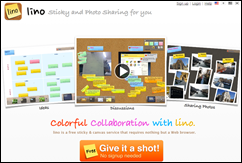 A linoit board is a virtual free bulletin board which can be populated with online stickies. These stickies can have resoeurces such as videos, weblinks and images added as well as text. You can organise the board in any way that you want. The board can be public or private and stickies can be moderated before being published by the creator. Only the creator of the board can delete stickies.
How to create a Linoit Board
My presentation on how to create a Linoit board
A tutorial
Here is a gre...
A linoit board is a virtual free bulletin board which can be populated with online stickies. These stickies can have resoeurces such as videos, weblinks and images added as well as text. You can organise the board in any way that you want. The board can be public or private and stickies can be moderated before being published by the creator. Only the creator of the board can delete stickies.
How to create a Linoit Board
My presentation on how to create a Linoit board
A tutorial
Here is a gre... We are pleased to announce that we will be holding a webinar this week on Tuesday afternoon (15th October) at 3.30pm. Here are the details:
Name: Use Padlet and Linoit for collecting student responses
Summary: This webinar takes a look at two very useful, free webtools for recording student responses with no sign-in required by the students, namely Padlet and Linoit. The responses appear on the created board like online sticky notes. We will look at ways of using this tool in the classroom.
Presenter...
We are pleased to announce that we will be holding a webinar this week on Tuesday afternoon (15th October) at 3.30pm. Here are the details:
Name: Use Padlet and Linoit for collecting student responses
Summary: This webinar takes a look at two very useful, free webtools for recording student responses with no sign-in required by the students, namely Padlet and Linoit. The responses appear on the created board like online sticky notes. We will look at ways of using this tool in the classroom.
Presenter... Submitted by Fiona Beal
Anthony Egbers, a very innovative technology co-ordinator from Dainfern College recently wrote a great post on his blog, entitled ‘10 things I will be taking from the za.gafesummit.com’ and he encouraged other South African teachers that attended the Summit to do likewise. Great idea, Anthony, I have taken the challenge!
The EdtechTeam’s Google Summits are enormously popular and are held all over the world sometimes twice in a week! This initiative of the EdTechTeam has ha...
Submitted by Fiona Beal
Anthony Egbers, a very innovative technology co-ordinator from Dainfern College recently wrote a great post on his blog, entitled ‘10 things I will be taking from the za.gafesummit.com’ and he encouraged other South African teachers that attended the Summit to do likewise. Great idea, Anthony, I have taken the challenge!
The EdtechTeam’s Google Summits are enormously popular and are held all over the world sometimes twice in a week! This initiative of the EdTechTeam has ha... Judi Francisco is a very creative technology co-ordinator from Micklefield Girls’ Primary School in Cape Town. I always like to keep my eye on her to see what she is up to next! (In fact I wrote a blogpost about the event she co-ordinated at Micklefield last year – “What a privilege to attend IT Design Week report back to parents at Micklefield Primary“) So when she invited me to visit her classroom on the last day of her Grade 6 flipped/blended classroom ‘JustBlendit’ project a c...
 At the recent Google in Education Summit in Cape Town there were a number of presentations outlining the usefulness of Google Chrome as a browser option. Not only is it fast and reliable as a browser but it has a unique way of enabling almost everything that you want to do in your browsing session work right from the browser bar – by means of extensions. This is what my browser bar looks like currently and the list is growing.
Another unique feature in Chrome is that the Omnibox can be...
At the recent Google in Education Summit in Cape Town there were a number of presentations outlining the usefulness of Google Chrome as a browser option. Not only is it fast and reliable as a browser but it has a unique way of enabling almost everything that you want to do in your browsing session work right from the browser bar – by means of extensions. This is what my browser bar looks like currently and the list is growing.
Another unique feature in Chrome is that the Omnibox can be... TeachMeets are a great way to be exposed to new webtools that other teachers are using successfully in their classrooms. We keep a record of these on the TeachMeet South Africa wiki http://teachmeet-southafrica.wikispaces.com/. This wiki also gives ideas on how you can start a teachMeet at your school.
What is a TeachMeet?
A tiny professional development “un-conference” where teachers get together to simply share ideas or lessons using ICT as a tool using different devices. If one can...
TeachMeets are a great way to be exposed to new webtools that other teachers are using successfully in their classrooms. We keep a record of these on the TeachMeet South Africa wiki http://teachmeet-southafrica.wikispaces.com/. This wiki also gives ideas on how you can start a teachMeet at your school.
What is a TeachMeet?
A tiny professional development “un-conference” where teachers get together to simply share ideas or lessons using ICT as a tool using different devices. If one can... In the past I loved using Wallwisher for students to write responses to various questions in various lessons. The creators of Wallwisher recently felt that the name Wallwisher did not live up to their mission of having an online virtual surface that has all the benefits of being digital and the simplicity of a notepad. So the name was changed to Padlet (http://padlet.com)
Padlet can be described as an ‘online graffiti wall where teachers and students can have discussions, share web links, po...
In the past I loved using Wallwisher for students to write responses to various questions in various lessons. The creators of Wallwisher recently felt that the name Wallwisher did not live up to their mission of having an online virtual surface that has all the benefits of being digital and the simplicity of a notepad. So the name was changed to Padlet (http://padlet.com)
Padlet can be described as an ‘online graffiti wall where teachers and students can have discussions, share web links, po...























