It is #sendacardtoafriendday on Friday and in preparation, we will look at a quick way to create a picture card or a poster, using PowerPoint, to share with our friends on social media. As a demonstration, we will be creating a square card (see the picture above) to post to Instagram this coming Friday, but you can do any size you like (for instance, if you want to create a poster). You don’t have to stick to the normal landscape slide sizes!
So here are the quick steps:
Open PowerPoint on y...
This is a guest post from Matthew Hains from Crawford College, Sandton. . Matthew is one of our Microsoft 2016/2017 #MIEExperts from South Africa. Matthew recently shared a blogpost on the SchoolNet blog describing his visit to Microsoft’s E2 Global Exchange Toronto in Canada as part of the South African delegation. Read his post here. Also visit Matthew;’s technology blog http://www.techteachers.co.za.
In today’s post Matthew talks about his use of PowerPoint to create a game.
...
Submitted by Fiona Beal
There’s no doubt about it – kids love selfies! It seems that we live in a selfie culture! Most kids use selfies as a way of communicating with their
friends and celebrating a moment. In the report Teens, technology and friendships the writers point out that social media and selfies are a natural draw for tweens and teens in our photo-orientated culture. Last term, I explored the idea the idea of letting one of the classes I teach create selfie ...
Submitted by Fiona Beal
Did you know that PowerPoint can be used in a multitude of ways apart from it’s original purpose of making slideshows. It is a great tool for creating e-books. This is part 1 of ‘Presenting class projects as e-books’. This term I set my Grade 7 ICT class a task of creating a Natural Sciences project in line with their class curriculum and presenting it as an online e-book using PowerPoint. In the next post, in Part 2, we will look at adding video and sound to th...
Submitted by Fiona Beal
Today I am giving a presentation at a school on how teachers around South Africa are using the newer Microsoft ICT tools in their classrooms and I thought I would upload it to Microsoft’s OneDrive and share it in case anyone from the talk wishes to look up some of the links. I am embedding the PowerPoint from OneDrive here as well. One Drive is a great tool for sharing Microsoft documents online.
.This is an embedded Microsoft Office presentation, powered by Office ...
Submitted by Fiona Beal
One Drive is a free Microsoft application that gives you free access to a range of Microsoft Office products. Have you registered for One Drive? https://onedrive.live.com You’ll receive 5GB of free storage.
I discovered recently that it is a great way to display students’ stories (or whaever else) that are written in PowerPoint, online by uploading them to PowerPoint online in Microsoft. I tried this out with a Grade 2 class. There is a wonderful Literacy...
It is very simple to create a lovely New Year’s greeting to put on Facebook
or a blog using Microsoft PowerPoint. It takes next to no time! We have done
this for two year’s running now.
What do you need
PowerPoint installed on your device or
you can use the free PowerPoint online found in OneDrive
A free PowerPoint
template
Some creativity…
Steps to creating an image greeting
1. Search for Free Happy New Year PowerPoint templates using your browser. I
came up with a selection from a site c...
One often hears the words ‘Death by PowerPoint’, and rightly so at times when PowerPoint presentations are cluttered, text-heavy and just plain boring! But did you know that PowerPoint is a powerful and useful application that can be used in many different, unexpected setting! Here are 25+ examples. I wonder if some of the other good presentation tools out there can also do all these…
PowerPoint is alive and well! 25+ ideas for using PowerPoint creatively in the classroom (by Fion...
This is a guest post from Deidre Bothma who is the Digital Learning Coordinator at Elkanah House Junior Schools. Deidre does very exciting lessons in her Grade R – 3 classes using a wide range of technology applications. In this post she uses Microsoft’s PowerPoint and Slideboom. This post also featured on Deidre’s blog http://technoboffins.wordpress.com/grade3/ Thank you for allowing us to use your post as a guest post Deidre!
____________________________________________________...
Mrs Truett’s Third Grade
Submitted by Fiona Beal
Earlier this term, whist researching on the Internet, I cam across two posts on adjectives that fascinated me. The first was a post in a Grade 3 blog (Mrs Truter’s Third Grade) showing two photos of an activity on Adjectives http://goo.gl/2BtmFo (see one of the photos on the right). The second post was a video on the use of adjectives in descriptive writing found at http://goo.gl/OmZ77H This gave me the idea of doing ...
SchoolNet South Africa is an incorporated Non Profit Company - Registration 2001/012244/08, NPO Number 030-817
and holds Public Benefit Organisation (PBO) Status, in terms of Section 30 of the Income Tax Act - PBO Number 130003557.

 It is #sendacardtoafriendday on Friday and in preparation, we will look at a quick way to create a picture card or a poster, using PowerPoint, to share with our friends on social media. As a demonstration, we will be creating a square card (see the picture above) to post to Instagram this coming Friday, but you can do any size you like (for instance, if you want to create a poster). You don’t have to stick to the normal landscape slide sizes!
So here are the quick steps:
Open PowerPoint on y...
It is #sendacardtoafriendday on Friday and in preparation, we will look at a quick way to create a picture card or a poster, using PowerPoint, to share with our friends on social media. As a demonstration, we will be creating a square card (see the picture above) to post to Instagram this coming Friday, but you can do any size you like (for instance, if you want to create a poster). You don’t have to stick to the normal landscape slide sizes!
So here are the quick steps:
Open PowerPoint on y... This is a guest post from Matthew Hains from Crawford College, Sandton. . Matthew is one of our Microsoft 2016/2017 #MIEExperts from South Africa. Matthew recently shared a blogpost on the SchoolNet blog describing his visit to Microsoft’s E2 Global Exchange Toronto in Canada as part of the South African delegation. Read his post here. Also visit Matthew;’s technology blog http://www.techteachers.co.za.
In today’s post Matthew talks about his use of PowerPoint to create a game.
...
This is a guest post from Matthew Hains from Crawford College, Sandton. . Matthew is one of our Microsoft 2016/2017 #MIEExperts from South Africa. Matthew recently shared a blogpost on the SchoolNet blog describing his visit to Microsoft’s E2 Global Exchange Toronto in Canada as part of the South African delegation. Read his post here. Also visit Matthew;’s technology blog http://www.techteachers.co.za.
In today’s post Matthew talks about his use of PowerPoint to create a game.
... Submitted by Fiona Beal
There’s no doubt about it – kids love selfies! It seems that we live in a selfie culture! Most kids use selfies as a way of communicating with their
friends and celebrating a moment. In the report Teens, technology and friendships the writers point out that social media and selfies are a natural draw for tweens and teens in our photo-orientated culture. Last term, I explored the idea the idea of letting one of the classes I teach create selfie ...
Submitted by Fiona Beal
There’s no doubt about it – kids love selfies! It seems that we live in a selfie culture! Most kids use selfies as a way of communicating with their
friends and celebrating a moment. In the report Teens, technology and friendships the writers point out that social media and selfies are a natural draw for tweens and teens in our photo-orientated culture. Last term, I explored the idea the idea of letting one of the classes I teach create selfie ... Submitted by Fiona Beal
Did you know that PowerPoint can be used in a multitude of ways apart from it’s original purpose of making slideshows. It is a great tool for creating e-books. This is part 1 of ‘Presenting class projects as e-books’. This term I set my Grade 7 ICT class a task of creating a Natural Sciences project in line with their class curriculum and presenting it as an online e-book using PowerPoint. In the next post, in Part 2, we will look at adding video and sound to th...
Submitted by Fiona Beal
Did you know that PowerPoint can be used in a multitude of ways apart from it’s original purpose of making slideshows. It is a great tool for creating e-books. This is part 1 of ‘Presenting class projects as e-books’. This term I set my Grade 7 ICT class a task of creating a Natural Sciences project in line with their class curriculum and presenting it as an online e-book using PowerPoint. In the next post, in Part 2, we will look at adding video and sound to th... Submitted by Fiona Beal
One Drive is a free Microsoft application that gives you free access to a range of Microsoft Office products. Have you registered for One Drive? https://onedrive.live.com You’ll receive 5GB of free storage.
I discovered recently that it is a great way to display students’ stories (or whaever else) that are written in PowerPoint, online by uploading them to PowerPoint online in Microsoft. I tried this out with a Grade 2 class. There is a wonderful Literacy...
Submitted by Fiona Beal
One Drive is a free Microsoft application that gives you free access to a range of Microsoft Office products. Have you registered for One Drive? https://onedrive.live.com You’ll receive 5GB of free storage.
I discovered recently that it is a great way to display students’ stories (or whaever else) that are written in PowerPoint, online by uploading them to PowerPoint online in Microsoft. I tried this out with a Grade 2 class. There is a wonderful Literacy... It is very simple to create a lovely New Year’s greeting to put on Facebook
or a blog using Microsoft PowerPoint. It takes next to no time! We have done
this for two year’s running now.
What do you need
PowerPoint installed on your device or
you can use the free PowerPoint online found in OneDrive
A free PowerPoint
template
Some creativity…
Steps to creating an image greeting
1. Search for Free Happy New Year PowerPoint templates using your browser. I
came up with a selection from a site c...
It is very simple to create a lovely New Year’s greeting to put on Facebook
or a blog using Microsoft PowerPoint. It takes next to no time! We have done
this for two year’s running now.
What do you need
PowerPoint installed on your device or
you can use the free PowerPoint online found in OneDrive
A free PowerPoint
template
Some creativity…
Steps to creating an image greeting
1. Search for Free Happy New Year PowerPoint templates using your browser. I
came up with a selection from a site c... This is a guest post from Deidre Bothma who is the Digital Learning Coordinator at Elkanah House Junior Schools. Deidre does very exciting lessons in her Grade R – 3 classes using a wide range of technology applications. In this post she uses Microsoft’s PowerPoint and Slideboom. This post also featured on Deidre’s blog http://technoboffins.wordpress.com/grade3/ Thank you for allowing us to use your post as a guest post Deidre!
____________________________________________________...
This is a guest post from Deidre Bothma who is the Digital Learning Coordinator at Elkanah House Junior Schools. Deidre does very exciting lessons in her Grade R – 3 classes using a wide range of technology applications. In this post she uses Microsoft’s PowerPoint and Slideboom. This post also featured on Deidre’s blog http://technoboffins.wordpress.com/grade3/ Thank you for allowing us to use your post as a guest post Deidre!
____________________________________________________... Mrs Truett’s Third Grade
Submitted by Fiona Beal
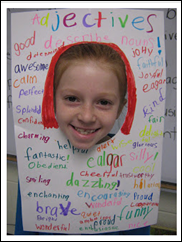
Earlier this term, whist researching on the Internet, I cam across two posts on adjectives that fascinated me. The first was a post in a Grade 3 blog (Mrs Truter’s Third Grade) showing two photos of an activity on Adjectives http://goo.gl/2BtmFo (see one of the photos on the right). The second post was a video on the use of adjectives in descriptive writing found at http://goo.gl/OmZ77H This gave me the idea of doing ...
Mrs Truett’s Third Grade
Submitted by Fiona Beal
Earlier this term, whist researching on the Internet, I cam across two posts on adjectives that fascinated me. The first was a post in a Grade 3 blog (Mrs Truter’s Third Grade) showing two photos of an activity on Adjectives http://goo.gl/2BtmFo (see one of the photos on the right). The second post was a video on the use of adjectives in descriptive writing found at http://goo.gl/OmZ77H This gave me the idea of doing ...























