Submitted by Fiona Beal
#edchatsa is the hashtag for our weekly twitter chat for South African teachers on topics of educational interest. These chats take place on a Monday evening from 8:30pm – 9:30pm. This blogpost aims to show you how I went about summarising a chat using Storify.com
Today curating is the buzz word with many amazing sites available to do just that. Storify is a form of curating – one can gather tweets, comments, videos, images and other media from all around the Web and pu...
Submitted by Fiona Beal
Last week I wrote a blogpost and challenged teachers to consider creating a wiki if they don’t already have one. My post was called ‘Why not create a wiki for your classroom’? A wiki is a superb calssroom tool, really. Well, if you took the challenge and created a wiki, I have some more fabulous tips for you to spruce it up a bit.
Add navigation pages
The first thing you could so is add navigation pages on the left hand side to give it that website feel...
Submitted by Fiona Beal
Have you ever considered using a wiki in your class? It can be a fabulous classroom tool with a multitude of uses.
What is a wiki?
A wiki is a space on the Web where you can share work and ideas, pictures and links, videos and media — and anything else you can think of. It is like a website but it doesn’t require any special knowledge of HTML. Anyone who joins the wiki can write and edit on the wiki which makes it ideal for classroom use. What I like about using a w...
Dropbox is a fantastic programme that gives you 2GB free if you install it on your computer. If you invite others you can get masses more free space. It really is worth downloading and installing Dropbox on to your computer. Once installed it makes a folder in your Documents folder. Whatever you place in this new Dropbox folder is aautomatically backed up on the web and can be accessed from anywhere. So just to have an online backup for your important documents is wonderful.The other marvelous part of D...
Submitted by Fiona Beal
It all started when Philemon Kotsokoane tweeted me (on Twitter) saying “… I’d like to follow last night’s chat on tweetchat.com How do I access all the chat & remove smart pausing message?#edchatsa”
Up to that point I had only been using a free programme called Tweetdeck for Twitter chats. I wrote a blogpost on how to use Tweetdeck last month https://www.schoolnet.org.za/2012/03/why-not-install-and-use-tweetdeck-for.html The reason I ...
This is a guest post from Lisa Gair who is the technology teacher at the Rock Academy in Fish Hoek. She originally placed this post on her school blog: http://rockacademynews.blogspot.com/, and since Lisa is a keen SchoolNetter I asked her if I could use her post on the SchoolNet blog. Thank you Lisa!
With us making increasing use of technology for class related projects, we are encouraging children and parents to take their camera’s on outings and to special school events, and then to email their...
There are many url shortening online programmes around, and I could never quite understand the need for them until I started sharing and networking! For example when using Twitter a long web address will use nearly all your 140 characters! The application I have tended to use is Bit.ly.com, so I thought I would do a quick share on how it all works. Below is a screenshot of the Bit.ly interface.
Whenever I start communicating with my PLN using Twitter, the first thing I do is open Bit.ly ...
Last Monday night from 8:30pm – 9:30pm one of our social media in education activitists in South Africa, Arthur Preston, Head at Elkanah House Primary School in Cape Town, introduced a Twitter chat for South African teachers on the #edchatsa hashtag. It was a wonderfully stimulating chat with many teachers from around the country participating. Teachers only got to know about it via Twitter and had a great chat about the topic, “If there was one piece of technology that could change South African educ...
You have probably heard the word ‘curator’ being bandied around? ‘Curating’ is one of the latest buzzwords and that is what Scoop.it does. (I haven’t yet investigated Paper.li but it could be similar). So, what happens is you join Scoop.it (http://www.scoopit.com) and choose a topic you would like information about.
Scoop.it then crawls the Internet searching for articles based on the keywords you have given to your search topic. You then curate by choosing which ...
I just love all the different features of Slideshare. Last week I explored adding YouTube videos to Slideshare. Today was my day with experimenting with the Slideshare playlist widget. I got the idea from http://web2teachingtools.wikispaces.com/SlideShare. First of all I created my three PowerPoints about creating online forms. I uploaded those to Slideshare:
1) Google forms – so easy to create
This form is definitely my favourite. I can’t believe that Google can give us so m...
SchoolNet South Africa is an incorporated Non Profit Company - Registration 2001/012244/08, NPO Number 030-817
and holds Public Benefit Organisation (PBO) Status, in terms of Section 30 of the Income Tax Act - PBO Number 130003557.

 Submitted by Fiona Beal
#edchatsa is the hashtag for our weekly twitter chat for South African teachers on topics of educational interest. These chats take place on a Monday evening from 8:30pm – 9:30pm. This blogpost aims to show you how I went about summarising a chat using Storify.com
Today curating is the buzz word with many amazing sites available to do just that. Storify is a form of curating – one can gather tweets, comments, videos, images and other media from all around the Web and pu...
Submitted by Fiona Beal
#edchatsa is the hashtag for our weekly twitter chat for South African teachers on topics of educational interest. These chats take place on a Monday evening from 8:30pm – 9:30pm. This blogpost aims to show you how I went about summarising a chat using Storify.com
Today curating is the buzz word with many amazing sites available to do just that. Storify is a form of curating – one can gather tweets, comments, videos, images and other media from all around the Web and pu...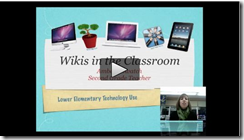 Submitted by Fiona Beal
Have you ever considered using a wiki in your class? It can be a fabulous classroom tool with a multitude of uses.
What is a wiki?
A wiki is a space on the Web where you can share work and ideas, pictures and links, videos and media — and anything else you can think of. It is like a website but it doesn’t require any special knowledge of HTML. Anyone who joins the wiki can write and edit on the wiki which makes it ideal for classroom use. What I like about using a w...
Submitted by Fiona Beal
Have you ever considered using a wiki in your class? It can be a fabulous classroom tool with a multitude of uses.
What is a wiki?
A wiki is a space on the Web where you can share work and ideas, pictures and links, videos and media — and anything else you can think of. It is like a website but it doesn’t require any special knowledge of HTML. Anyone who joins the wiki can write and edit on the wiki which makes it ideal for classroom use. What I like about using a w... Submitted by Fiona Beal
It all started when Philemon Kotsokoane tweeted me (on Twitter) saying “… I’d like to follow last night’s chat on tweetchat.com How do I access all the chat & remove smart pausing message?#edchatsa”
Up to that point I had only been using a free programme called Tweetdeck for Twitter chats. I wrote a blogpost on how to use Tweetdeck last month https://www.schoolnet.org.za/2012/03/why-not-install-and-use-tweetdeck-for.html The reason I ...
Submitted by Fiona Beal
It all started when Philemon Kotsokoane tweeted me (on Twitter) saying “… I’d like to follow last night’s chat on tweetchat.com How do I access all the chat & remove smart pausing message?#edchatsa”
Up to that point I had only been using a free programme called Tweetdeck for Twitter chats. I wrote a blogpost on how to use Tweetdeck last month https://www.schoolnet.org.za/2012/03/why-not-install-and-use-tweetdeck-for.html The reason I ...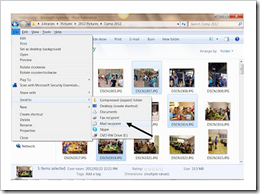 This is a guest post from Lisa Gair who is the technology teacher at the Rock Academy in Fish Hoek. She originally placed this post on her school blog: http://rockacademynews.blogspot.com/, and since Lisa is a keen SchoolNetter I asked her if I could use her post on the SchoolNet blog. Thank you Lisa!
With us making increasing use of technology for class related projects, we are encouraging children and parents to take their camera’s on outings and to special school events, and then to email their...
This is a guest post from Lisa Gair who is the technology teacher at the Rock Academy in Fish Hoek. She originally placed this post on her school blog: http://rockacademynews.blogspot.com/, and since Lisa is a keen SchoolNetter I asked her if I could use her post on the SchoolNet blog. Thank you Lisa!
With us making increasing use of technology for class related projects, we are encouraging children and parents to take their camera’s on outings and to special school events, and then to email their...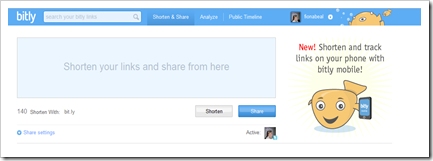 There are many url shortening online programmes around, and I could never quite understand the need for them until I started sharing and networking! For example when using Twitter a long web address will use nearly all your 140 characters! The application I have tended to use is Bit.ly.com, so I thought I would do a quick share on how it all works. Below is a screenshot of the Bit.ly interface.
Whenever I start communicating with my PLN using Twitter, the first thing I do is open Bit.ly ...
There are many url shortening online programmes around, and I could never quite understand the need for them until I started sharing and networking! For example when using Twitter a long web address will use nearly all your 140 characters! The application I have tended to use is Bit.ly.com, so I thought I would do a quick share on how it all works. Below is a screenshot of the Bit.ly interface.
Whenever I start communicating with my PLN using Twitter, the first thing I do is open Bit.ly ...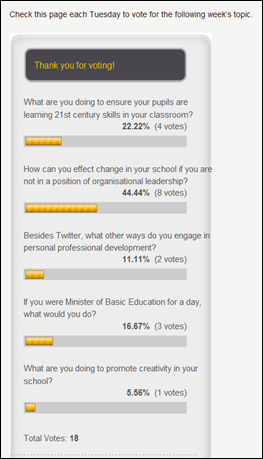 Last Monday night from 8:30pm – 9:30pm one of our social media in education activitists in South Africa, Arthur Preston, Head at Elkanah House Primary School in Cape Town, introduced a Twitter chat for South African teachers on the #edchatsa hashtag. It was a wonderfully stimulating chat with many teachers from around the country participating. Teachers only got to know about it via Twitter and had a great chat about the topic, “If there was one piece of technology that could change South African educ...
 You have probably heard the word ‘curator’ being bandied around? ‘Curating’ is one of the latest buzzwords and that is what Scoop.it does. (I haven’t yet investigated Paper.li but it could be similar). So, what happens is you join Scoop.it (http://www.scoopit.com) and choose a topic you would like information about.
Scoop.it then crawls the Internet searching for articles based on the keywords you have given to your search topic. You then curate by choosing which ...
You have probably heard the word ‘curator’ being bandied around? ‘Curating’ is one of the latest buzzwords and that is what Scoop.it does. (I haven’t yet investigated Paper.li but it could be similar). So, what happens is you join Scoop.it (http://www.scoopit.com) and choose a topic you would like information about.
Scoop.it then crawls the Internet searching for articles based on the keywords you have given to your search topic. You then curate by choosing which ...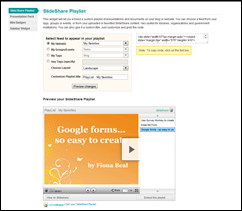 I just love all the different features of Slideshare. Last week I explored adding YouTube videos to Slideshare. Today was my day with experimenting with the Slideshare playlist widget. I got the idea from http://web2teachingtools.wikispaces.com/SlideShare. First of all I created my three PowerPoints about creating online forms. I uploaded those to Slideshare:
1) Google forms – so easy to create
This form is definitely my favourite. I can’t believe that Google can give us so m...
I just love all the different features of Slideshare. Last week I explored adding YouTube videos to Slideshare. Today was my day with experimenting with the Slideshare playlist widget. I got the idea from http://web2teachingtools.wikispaces.com/SlideShare. First of all I created my three PowerPoints about creating online forms. I uploaded those to Slideshare:
1) Google forms – so easy to create
This form is definitely my favourite. I can’t believe that Google can give us so m...























