Submitted by Fiona Beal
Last week I was kindly loaned a Chromebook by Alister Payne, Deputy Principal at WPPS school in Cape Town. (Their school is planning to use Chromebooks throughout). Great excitement! These devices are currently not readily available in South Africa…but the first consignments are on their way! I had the privilege of using a Chromebook at the Google Teacher Academy in New York in 2012 and was impressed with its immediate start up speed in less than 10 seconds, it’s 8 hour ba...
The Microsoft in Education Global Forum is taking place in Redmond, Washington in March 2015. If you think you’ve got what it takes to be recognised as a Microsoft Innovative Educator, join the Microsoft Educator Network and upload a learning activity that demonstrates how you are using 21st century teaching practices in your classroom by 24 October 2014
Microsoft believes that technology alone cannot build 21st century skills for students. Technology is an accelerator, but alone it does not enable ...
What are you doing on Tuesday afternoon from 2:30 – 3:30pm? Why not join the Doodle 4 Google team at Western Province Preparatory School in Cape Town? A letter from the team follows:
Dear Principals and Teachers
Google South Africa invites you to join us for an afternoon of technology and creativity.
Where: Western Province Preparatory School, Centenary Pavilion, Upstairs, 49 Newlands Road, Claremont. Street parking available on Eyton Road or surrounds
When: Tuesday, 16th September 2...
Recently several really exciting competitions, both local and international, being announced with great prizes. Here they are gathered together in one post. Think about entering!
LOCAL COMPETITIONS
1. Microsoft Innovative Educator
http://goo.gl/PAsOJx Closing date for South Africa 15th October
The Microsoft in Education Global Forum taking place in Redmond, Washington in March 2015. If you think you’ve got what it takes to be recognised as a Microsoft Innovative Educator, join the Microsoft Edu...
Most of our South African learners do not have access to computers however many of them DO have access to a mobile phone. This free Nokia MoMaths initiative gives Grade 10-12 learners the opportunity to study mathematics anywhere and anytime, which in turn gives them the chance to empower themselves.
Students who sign up can access the mobile maths program for FREE whenever they like. Results have shown the collaborative networking format of the maths application on MXit encourages the children t...
Submitted by Fiona Beal
Have you ever downloaded a recommended application from the Internet and in so doing downloaded some unwanted third party software as well? Yes? It happens to us all at some time or other I think. It happened to me yesterday on my Windows laptop!
Yesterday I put out a tweet about a useful application program that I had discovered and liked, and someone replied mentioning a similar application that they use successfully. So, of course, I decided to download their recommended ...
From your Office 365 dashboard, select users and groups from the menu on the left side of the screen.
This will bring up your list of active users.
Go to the four icons above Display name and click on the second icon from the left.
This gives you the option to select your .csv file for uploading. If you don’t have one, you now have the option to download a blank copy for completion.
The screen will look like this
Your .csv file is an Excel spreadsheet that must be in a particular format ...
Recently, on our Nokia post entitled ‘The free Nokia Mobile Maths service (Gr 10-12) is available for smartphone but also works on a PC’ we received a very encouraging comment naming Nokia Mobile Maths as an excellent service…
“Thank you so much for this blog – as a Maths consultant involved in the authoring and editing of this material, I am very happy to see this excellent service advertised more widely. I wish to briefly highlight 2 additional features that I believe are worth being awar...
This is the third post in a short series of Office 365 posts which have been written by Microsoft South Africa, taking you through getting acquainted with Office 365. They are available in the Microsoft Provisioning Guide. See
________________________________________
Your users are your educational establishment community. This normally means teachers, lecturers and students as well as administration staff, but who you add is entirely up to you and your educational establishment.
You might w...
Signing up for Office 365
Go to the Office 365 portal to set up your account. The portal can be found at http://aka.ms/o365EduZa – click on Try now and you will see a screen that looks like this:
Be careful when selecting your username as it cannot be changed once entered. When you have completed this form (ensuring you have selected the correct location country for your establishment) click on next.
You will now be able to complete the verification process. This will register your educ...
SchoolNet South Africa is an incorporated Non Profit Company - Registration 2001/012244/08, NPO Number 030-817
and holds Public Benefit Organisation (PBO) Status, in terms of Section 30 of the Income Tax Act - PBO Number 130003557.

 Submitted by Fiona Beal
Last week I was kindly loaned a Chromebook by Alister Payne, Deputy Principal at WPPS school in Cape Town. (Their school is planning to use Chromebooks throughout). Great excitement! These devices are currently not readily available in South Africa…but the first consignments are on their way! I had the privilege of using a Chromebook at the Google Teacher Academy in New York in 2012 and was impressed with its immediate start up speed in less than 10 seconds, it’s 8 hour ba...
Submitted by Fiona Beal
Last week I was kindly loaned a Chromebook by Alister Payne, Deputy Principal at WPPS school in Cape Town. (Their school is planning to use Chromebooks throughout). Great excitement! These devices are currently not readily available in South Africa…but the first consignments are on their way! I had the privilege of using a Chromebook at the Google Teacher Academy in New York in 2012 and was impressed with its immediate start up speed in less than 10 seconds, it’s 8 hour ba... The Microsoft in Education Global Forum is taking place in Redmond, Washington in March 2015. If you think you’ve got what it takes to be recognised as a Microsoft Innovative Educator, join the Microsoft Educator Network and upload a learning activity that demonstrates how you are using 21st century teaching practices in your classroom by 24 October 2014
Microsoft believes that technology alone cannot build 21st century skills for students. Technology is an accelerator, but alone it does not enable ...
The Microsoft in Education Global Forum is taking place in Redmond, Washington in March 2015. If you think you’ve got what it takes to be recognised as a Microsoft Innovative Educator, join the Microsoft Educator Network and upload a learning activity that demonstrates how you are using 21st century teaching practices in your classroom by 24 October 2014
Microsoft believes that technology alone cannot build 21st century skills for students. Technology is an accelerator, but alone it does not enable ... What are you doing on Tuesday afternoon from 2:30 – 3:30pm? Why not join the Doodle 4 Google team at Western Province Preparatory School in Cape Town? A letter from the team follows:
Dear Principals and Teachers
Google South Africa invites you to join us for an afternoon of technology and creativity.
Where: Western Province Preparatory School, Centenary Pavilion, Upstairs, 49 Newlands Road, Claremont. Street parking available on Eyton Road or surrounds
When: Tuesday, 16th September 2...
What are you doing on Tuesday afternoon from 2:30 – 3:30pm? Why not join the Doodle 4 Google team at Western Province Preparatory School in Cape Town? A letter from the team follows:
Dear Principals and Teachers
Google South Africa invites you to join us for an afternoon of technology and creativity.
Where: Western Province Preparatory School, Centenary Pavilion, Upstairs, 49 Newlands Road, Claremont. Street parking available on Eyton Road or surrounds
When: Tuesday, 16th September 2... Recently several really exciting competitions, both local and international, being announced with great prizes. Here they are gathered together in one post. Think about entering!
LOCAL COMPETITIONS
1. Microsoft Innovative Educator
http://goo.gl/PAsOJx Closing date for South Africa 15th October
The Microsoft in Education Global Forum taking place in Redmond, Washington in March 2015. If you think you’ve got what it takes to be recognised as a Microsoft Innovative Educator, join the Microsoft Edu...
Recently several really exciting competitions, both local and international, being announced with great prizes. Here they are gathered together in one post. Think about entering!
LOCAL COMPETITIONS
1. Microsoft Innovative Educator
http://goo.gl/PAsOJx Closing date for South Africa 15th October
The Microsoft in Education Global Forum taking place in Redmond, Washington in March 2015. If you think you’ve got what it takes to be recognised as a Microsoft Innovative Educator, join the Microsoft Edu...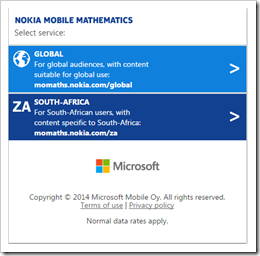 Most of our South African learners do not have access to computers however many of them DO have access to a mobile phone. This free Nokia MoMaths initiative gives Grade 10-12 learners the opportunity to study mathematics anywhere and anytime, which in turn gives them the chance to empower themselves.
Students who sign up can access the mobile maths program for FREE whenever they like. Results have shown the collaborative networking format of the maths application on MXit encourages the children t...
Most of our South African learners do not have access to computers however many of them DO have access to a mobile phone. This free Nokia MoMaths initiative gives Grade 10-12 learners the opportunity to study mathematics anywhere and anytime, which in turn gives them the chance to empower themselves.
Students who sign up can access the mobile maths program for FREE whenever they like. Results have shown the collaborative networking format of the maths application on MXit encourages the children t... Submitted by Fiona Beal
Have you ever downloaded a recommended application from the Internet and in so doing downloaded some unwanted third party software as well? Yes? It happens to us all at some time or other I think. It happened to me yesterday on my Windows laptop!
Yesterday I put out a tweet about a useful application program that I had discovered and liked, and someone replied mentioning a similar application that they use successfully. So, of course, I decided to download their recommended ...
Submitted by Fiona Beal
Have you ever downloaded a recommended application from the Internet and in so doing downloaded some unwanted third party software as well? Yes? It happens to us all at some time or other I think. It happened to me yesterday on my Windows laptop!
Yesterday I put out a tweet about a useful application program that I had discovered and liked, and someone replied mentioning a similar application that they use successfully. So, of course, I decided to download their recommended ... From your Office 365 dashboard, select users and groups from the menu on the left side of the screen.
This will bring up your list of active users.
Go to the four icons above Display name and click on the second icon from the left.
This gives you the option to select your .csv file for uploading. If you don’t have one, you now have the option to download a blank copy for completion.
The screen will look like this
Your .csv file is an Excel spreadsheet that must be in a particular format ...
From your Office 365 dashboard, select users and groups from the menu on the left side of the screen.
This will bring up your list of active users.
Go to the four icons above Display name and click on the second icon from the left.
This gives you the option to select your .csv file for uploading. If you don’t have one, you now have the option to download a blank copy for completion.
The screen will look like this
Your .csv file is an Excel spreadsheet that must be in a particular format ... Recently, on our Nokia post entitled ‘The free Nokia Mobile Maths service (Gr 10-12) is available for smartphone but also works on a PC’ we received a very encouraging comment naming Nokia Mobile Maths as an excellent service…
“Thank you so much for this blog – as a Maths consultant involved in the authoring and editing of this material, I am very happy to see this excellent service advertised more widely. I wish to briefly highlight 2 additional features that I believe are worth being awar...
Recently, on our Nokia post entitled ‘The free Nokia Mobile Maths service (Gr 10-12) is available for smartphone but also works on a PC’ we received a very encouraging comment naming Nokia Mobile Maths as an excellent service…
“Thank you so much for this blog – as a Maths consultant involved in the authoring and editing of this material, I am very happy to see this excellent service advertised more widely. I wish to briefly highlight 2 additional features that I believe are worth being awar... Signing up for Office 365
Go to the Office 365 portal to set up your account. The portal can be found at http://aka.ms/o365EduZa – click on Try now and you will see a screen that looks like this:
Be careful when selecting your username as it cannot be changed once entered. When you have completed this form (ensuring you have selected the correct location country for your establishment) click on next.
You will now be able to complete the verification process. This will register your educ...
Signing up for Office 365
Go to the Office 365 portal to set up your account. The portal can be found at http://aka.ms/o365EduZa – click on Try now and you will see a screen that looks like this:
Be careful when selecting your username as it cannot be changed once entered. When you have completed this form (ensuring you have selected the correct location country for your establishment) click on next.
You will now be able to complete the verification process. This will register your educ...























