Submitted by Fiona Beal
These are a few of the posts about using Google products for education that caught my attention at the beginning of last week. A whole lot of interesting posts appeared after that – but those will have to wait until later in the week!
1. New Google Docs feature: Editing student documents just got easier!
http://goo.gl/vr61rs
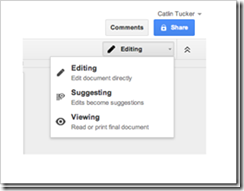
Now, any user with “can comment” access to a document can make suggested edits to the document. These suggestions are marked by a green brac...
Have you entered the Doodle4Google South Africa competition with its great prizes on offer? The closing date is October 22nd. Drawing these doodles could be a great end-of-term activity for your class. Read the following letter from Google South Africa
“Dear Teacher
Would you like your student’s artwork to be viewed by millions of South Africans on the homepage of www.google.co.za? Would you like your school to benefit from a R100 000...
The great thing about Nokia mobile maths is that this platform, which is for Grades 10 – 12 Maths students in South Africa, is available on any Internet-connected mobile phone, tablet or PC, and is “zero rated” for use on the MTN and Cell C networks. the sole aim is to help South African high school pupils to better master the subject of mathematics.
Access to the Nokia Mobile Mathematics (MoMaths) portal has been “zero rated” on MTN and Cell C, which means that learners don’t pay for...
Submitted by Fiona Beal
Digital Storytelling is all the rage currently. One of the online tools that one can use to create a story is WeVideo. WeVideo has several pricing plans one of which is a free plan.
I am particularly interested in this application as it is one of the Apps that integrates with Google Drive. Richard Byrne has written about this feature in a post called ‘Create Videos Online with WeVideo in Google Drive’.
&nb...
Submitted by Fiona Beal
Recently I saw a Google+ post from Google for Education that said ‘Make a Google site in minutes’. This immediately caught my attention as I imagined it would take a mush longer time than that. The post in question said that all one needs to do is follow the six steps listed below. I tried it and, quite honestly, it IS as simple as that!
What is a Google site?
A Google site can be seen as an interactive website that is quick and easy to create without any knowledge o...
Office 365 requires the following software:
– The current or immediately prior version of Internet Explorer, or the latest release of Chrome, Firefox or Safari.
– Any version of Microsoft Office in mainstream support.
Google Chrome
Latest version can perform all browser-related tasks
Firefox
Latest version can perform almost all browser-related tasks
Safari
Latest version can perform almost all browser-related tasks
Mobile Devices
Not included
Internet Explorer 10
Dep...
This is the fifth post in a short series of Office 365 posts which have been written by Microsoft South Africa, taking you through getting acquainted with Office 365. They are available in the
Once your domain has been verified as a bona fide education establishment you will be able to convert your trial into the full version when your 30 day trial comes to an end.
Go to your dashboard.
From the left-hand menu, select purchase services.
Select the option for Office 365 plans for education. ...
Submitted by Fiona Beal
One of the great things about using Google Drive and in partivular the Google Chrome browser, is that the list of education apps that integrate with Google Drive is growing daily. These apps are available from the Chrome webstore. They make a Chromebook really come alive in a classroom setting.
Holly Clark writes a lot about the Chromebook so I thought I would make a start by installing the apps she suggests for the Chromebook in her blog post ‘Chrome Apps perfect for th...
Submitted by Fiona Beal
Now that I have started using a Chromebook I keep seeing great articles about them on the web. One of the best ways to keep a record of those articles is to create a board in Pinterest and store all the wonderful sites you come across. I did just that! Click on the image below to be taken to the Pinterest board entitled ‘Çhromebook posts’.
...
Submitted by Fiona Beal
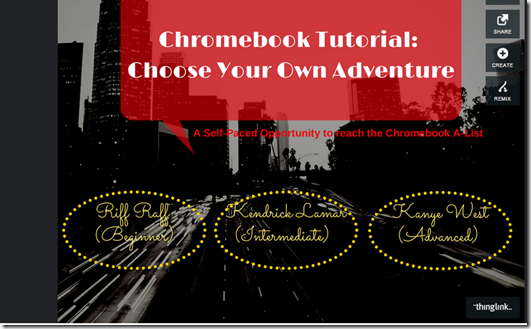
I started to look for some tutorials on using Chromebooks and came across this fantastic collection of three tutorials shared via a Thinglink interactive image! (Note to self: must make much greater use of Thinglink). These are tutorials provided by the ICT Co-ordinator at a school known as Saddleback. They are provided in three levels – beginner, intermediate and advanced – each with its own test and certificate. Click on the image below to be taken to th...
SchoolNet South Africa is an incorporated Non Profit Company - Registration 2001/012244/08, NPO Number 030-817
and holds Public Benefit Organisation (PBO) Status, in terms of Section 30 of the Income Tax Act - PBO Number 130003557.

 Submitted by Fiona Beal
These are a few of the posts about using Google products for education that caught my attention at the beginning of last week. A whole lot of interesting posts appeared after that – but those will have to wait until later in the week!
1. New Google Docs feature: Editing student documents just got easier!
http://goo.gl/vr61rs
Now, any user with “can comment” access to a document can make suggested edits to the document. These suggestions are marked by a green brac...
Submitted by Fiona Beal
These are a few of the posts about using Google products for education that caught my attention at the beginning of last week. A whole lot of interesting posts appeared after that – but those will have to wait until later in the week!
1. New Google Docs feature: Editing student documents just got easier!
http://goo.gl/vr61rs
Now, any user with “can comment” access to a document can make suggested edits to the document. These suggestions are marked by a green brac... Have you entered the Doodle4Google South Africa competition with its great prizes on offer? The closing date is October 22nd. Drawing these doodles could be a great end-of-term activity for your class. Read the following letter from Google South Africa
“Dear Teacher
Would you like your student’s artwork to be viewed by millions of South Africans on the homepage of www.google.co.za? Would you like your school to benefit from a R100 000...
Have you entered the Doodle4Google South Africa competition with its great prizes on offer? The closing date is October 22nd. Drawing these doodles could be a great end-of-term activity for your class. Read the following letter from Google South Africa
“Dear Teacher
Would you like your student’s artwork to be viewed by millions of South Africans on the homepage of www.google.co.za? Would you like your school to benefit from a R100 000...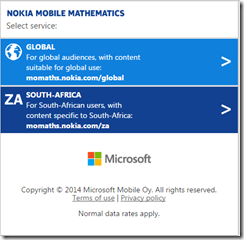 The great thing about Nokia mobile maths is that this platform, which is for Grades 10 – 12 Maths students in South Africa, is available on any Internet-connected mobile phone, tablet or PC, and is “zero rated” for use on the MTN and Cell C networks. the sole aim is to help South African high school pupils to better master the subject of mathematics.
Access to the Nokia Mobile Mathematics (MoMaths) portal has been “zero rated” on MTN and Cell C, which means that learners don’t pay for...
The great thing about Nokia mobile maths is that this platform, which is for Grades 10 – 12 Maths students in South Africa, is available on any Internet-connected mobile phone, tablet or PC, and is “zero rated” for use on the MTN and Cell C networks. the sole aim is to help South African high school pupils to better master the subject of mathematics.
Access to the Nokia Mobile Mathematics (MoMaths) portal has been “zero rated” on MTN and Cell C, which means that learners don’t pay for... Submitted by Fiona Beal
Digital Storytelling is all the rage currently. One of the online tools that one can use to create a story is WeVideo. WeVideo has several pricing plans one of which is a free plan.
I am particularly interested in this application as it is one of the Apps that integrates with Google Drive. Richard Byrne has written about this feature in a post called ‘Create Videos Online with WeVideo in Google Drive’.
&nb...
Submitted by Fiona Beal
Digital Storytelling is all the rage currently. One of the online tools that one can use to create a story is WeVideo. WeVideo has several pricing plans one of which is a free plan.
I am particularly interested in this application as it is one of the Apps that integrates with Google Drive. Richard Byrne has written about this feature in a post called ‘Create Videos Online with WeVideo in Google Drive’.
&nb... Submitted by Fiona Beal
Recently I saw a Google+ post from Google for Education that said ‘Make a Google site in minutes’. This immediately caught my attention as I imagined it would take a mush longer time than that. The post in question said that all one needs to do is follow the six steps listed below. I tried it and, quite honestly, it IS as simple as that!
What is a Google site?
A Google site can be seen as an interactive website that is quick and easy to create without any knowledge o...
Submitted by Fiona Beal
Recently I saw a Google+ post from Google for Education that said ‘Make a Google site in minutes’. This immediately caught my attention as I imagined it would take a mush longer time than that. The post in question said that all one needs to do is follow the six steps listed below. I tried it and, quite honestly, it IS as simple as that!
What is a Google site?
A Google site can be seen as an interactive website that is quick and easy to create without any knowledge o... Office 365 requires the following software:
– The current or immediately prior version of Internet Explorer, or the latest release of Chrome, Firefox or Safari.
– Any version of Microsoft Office in mainstream support.
Google Chrome
Latest version can perform all browser-related tasks
Firefox
Latest version can perform almost all browser-related tasks
Safari
Latest version can perform almost all browser-related tasks
Mobile Devices
Not included
Internet Explorer 10
Dep...
Office 365 requires the following software:
– The current or immediately prior version of Internet Explorer, or the latest release of Chrome, Firefox or Safari.
– Any version of Microsoft Office in mainstream support.
Google Chrome
Latest version can perform all browser-related tasks
Firefox
Latest version can perform almost all browser-related tasks
Safari
Latest version can perform almost all browser-related tasks
Mobile Devices
Not included
Internet Explorer 10
Dep...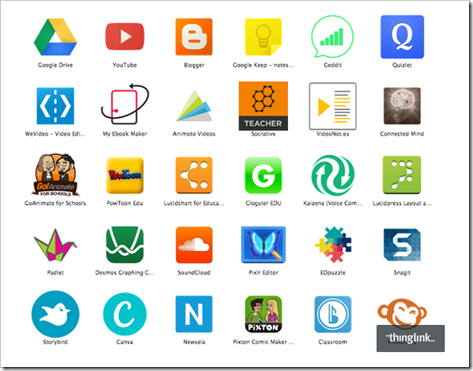 Submitted by Fiona Beal
One of the great things about using Google Drive and in partivular the Google Chrome browser, is that the list of education apps that integrate with Google Drive is growing daily. These apps are available from the Chrome webstore. They make a Chromebook really come alive in a classroom setting.
Holly Clark writes a lot about the Chromebook so I thought I would make a start by installing the apps she suggests for the Chromebook in her blog post ‘Chrome Apps perfect for th...
Submitted by Fiona Beal
One of the great things about using Google Drive and in partivular the Google Chrome browser, is that the list of education apps that integrate with Google Drive is growing daily. These apps are available from the Chrome webstore. They make a Chromebook really come alive in a classroom setting.
Holly Clark writes a lot about the Chromebook so I thought I would make a start by installing the apps she suggests for the Chromebook in her blog post ‘Chrome Apps perfect for th...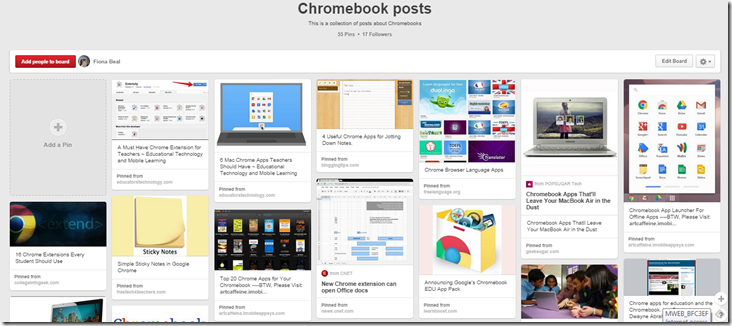 Submitted by Fiona Beal
Now that I have started using a Chromebook I keep seeing great articles about them on the web. One of the best ways to keep a record of those articles is to create a board in Pinterest and store all the wonderful sites you come across. I did just that! Click on the image below to be taken to the Pinterest board entitled ‘Çhromebook posts’.
...
Submitted by Fiona Beal
Now that I have started using a Chromebook I keep seeing great articles about them on the web. One of the best ways to keep a record of those articles is to create a board in Pinterest and store all the wonderful sites you come across. I did just that! Click on the image below to be taken to the Pinterest board entitled ‘Çhromebook posts’.
... Submitted by Fiona Beal
I started to look for some tutorials on using Chromebooks and came across this fantastic collection of three tutorials shared via a Thinglink interactive image! (Note to self: must make much greater use of Thinglink). These are tutorials provided by the ICT Co-ordinator at a school known as Saddleback. They are provided in three levels – beginner, intermediate and advanced – each with its own test and certificate. Click on the image below to be taken to th...
Submitted by Fiona Beal
I started to look for some tutorials on using Chromebooks and came across this fantastic collection of three tutorials shared via a Thinglink interactive image! (Note to self: must make much greater use of Thinglink). These are tutorials provided by the ICT Co-ordinator at a school known as Saddleback. They are provided in three levels – beginner, intermediate and advanced – each with its own test and certificate. Click on the image below to be taken to th...























