What is a Livebinder?
There is a lovely, free online site you may have heard of called LiveBinders (http://www.livebinders.com/). It is a free online service for teachers that lets them gather, organize and share information. It is like an online 3-ring binder that you can put anything (that is online) into – webpages, PDF, documents, images, or videos. Everything is organized by tab and you can even have subtabs within those tabs. I really wanted to create a Livebinder myself this week, b...
Screencasting is an amazing programme to use if you want to quickly show someone how to do something on the computer. It easily creates a video of what you are doing and saying. These are called screencasts. If you want to create good screencasts without the hassle of downloading and installing any application on your computer then Screencast-O-Matic is the best available tool for the purpose.
Other screencasting applications
I started off using Jing, until I discovered ScreenR. I have written a blo...
Nowadays there are so many different and amazing things you can do with your photographs online. You can store them, create gorgous slideshows, among other things. In this post I am going to outline sites for the following:
1) Sites for uploading photos to the Internet for storage
2) A search engine for royalty free photos
3) A talking photo site
4) A site for making large classroom posters
5) Sites for creating lovely slideshows
Take a look at this Slideshare for ideas:
Have ...
I also like to use Spiderscribe to mindmap as you can do so much more with it than with bubbl.us. With Spiderscribe you can easily make a very engaging attractive mindmap:
*you can add a text note, and even include active weblinks
*you can add photos,
*you can attach Word documents or PDFs
*you can attach maps
*you can attach calendar events. Below you can see more clearly the five elements you can add. Spiderscribe can be accessed at http://www.spiderscribe.net.
Be...
Why mindmap?
Mindmapping is a great thinking tool. It has been suggested that this visual technique can improve learning and study efficiency up to 15% over conventional note-taking. It is also a very popular planning technique and definitely something one should introduce in every classroom. It is a great way to brainstorm and generate ideas.
Use bubbl.us to mindmap
What I like about bubbl.us is that it is a simple non-elaborate mindmapping tool that is easy to catch on to, and is useful...
Pen.io is an interesting application for making a quick page with a URL. (Whatever you do in Google Docs will also be given a web URL but this is a much quicker method.)
1. Go to http://www.pen.io/. You will notice a straightforward page with a code in the left box entitled ‘Page name’. The code remains as the URL of your new page.
2. Give your page a password and then click on ‘Create new page’. You’ll be taken to the page where you can start writing.
3. Give your page a title...
Do you sometimes you wish you could cut a funny or interesting part out of a YouTube video and make a little clip to share with your class? Well, you can with Tube Chop!
1. Open http://www.tubechop.com/
2. Type in the URL of the video you want or the name of the video to chop and press Search. I put in ‘Gotta Share’ for one of my favourite videos. The original video URL for this video is http://www.youtube.com/watch?v=soAk3F0wX9s
3. Set the beginning of the clip and then cli...
Have you ever found that you are on a website and you want to quickly print the page or a portion of the page? When it prints it is lopsided because it was meant to be on landscape, it is 16 pages long which you didn’t realise plus you have wasted ink with a whole lot if unnecessary pictures and words (not to mention unwanted ads!)? That has happened to me so I was delighted to come across Print Friendly (http://www.printfriendly.com/) .
After opening Print Friendly, the first th...
You may run into times when you’re offline and want to watch a YouTube video, or you want to share a YouTube video with your class without going online and waiting for the video to open (a problem in SA with bandwidth). In those cases, you need an actual copy of the video rather than a link to the YouTube site. You can download videos to your computer using a marvelous free online tool called KeepVid (http://keepvid.com). This post aims to give directions on how to do this if you are new to Keep...
Often when you are watching a presentation and you have computer access you want to make a comment on what the presenter is saying. Twitter is most often used for this. But often, if one wishes the responses to be more private a backchanneling programme like Today’s Meet is used.
What is Today’sMeet?
Today’s meet is a simple way to set up an instant live chat room. It allows participants to ‘backchannel’. This means they can get fully involved by adding their comments and thoughts...
SchoolNet South Africa is an incorporated Non Profit Company - Registration 2001/012244/08, NPO Number 030-817
and holds Public Benefit Organisation (PBO) Status, in terms of Section 30 of the Income Tax Act - PBO Number 130003557.

 What is a Livebinder?
There is a lovely, free online site you may have heard of called LiveBinders (http://www.livebinders.com/). It is a free online service for teachers that lets them gather, organize and share information. It is like an online 3-ring binder that you can put anything (that is online) into – webpages, PDF, documents, images, or videos. Everything is organized by tab and you can even have subtabs within those tabs. I really wanted to create a Livebinder myself this week, b...
What is a Livebinder?
There is a lovely, free online site you may have heard of called LiveBinders (http://www.livebinders.com/). It is a free online service for teachers that lets them gather, organize and share information. It is like an online 3-ring binder that you can put anything (that is online) into – webpages, PDF, documents, images, or videos. Everything is organized by tab and you can even have subtabs within those tabs. I really wanted to create a Livebinder myself this week, b... Screencasting is an amazing programme to use if you want to quickly show someone how to do something on the computer. It easily creates a video of what you are doing and saying. These are called screencasts. If you want to create good screencasts without the hassle of downloading and installing any application on your computer then Screencast-O-Matic is the best available tool for the purpose.
Other screencasting applications
I started off using Jing, until I discovered ScreenR. I have written a blo...
Screencasting is an amazing programme to use if you want to quickly show someone how to do something on the computer. It easily creates a video of what you are doing and saying. These are called screencasts. If you want to create good screencasts without the hassle of downloading and installing any application on your computer then Screencast-O-Matic is the best available tool for the purpose.
Other screencasting applications
I started off using Jing, until I discovered ScreenR. I have written a blo... Nowadays there are so many different and amazing things you can do with your photographs online. You can store them, create gorgous slideshows, among other things. In this post I am going to outline sites for the following:
1) Sites for uploading photos to the Internet for storage
2) A search engine for royalty free photos
3) A talking photo site
4) A site for making large classroom posters
5) Sites for creating lovely slideshows
Take a look at this Slideshare for ideas:
Have ...
Nowadays there are so many different and amazing things you can do with your photographs online. You can store them, create gorgous slideshows, among other things. In this post I am going to outline sites for the following:
1) Sites for uploading photos to the Internet for storage
2) A search engine for royalty free photos
3) A talking photo site
4) A site for making large classroom posters
5) Sites for creating lovely slideshows
Take a look at this Slideshare for ideas:
Have ... I also like to use Spiderscribe to mindmap as you can do so much more with it than with bubbl.us. With Spiderscribe you can easily make a very engaging attractive mindmap:
*you can add a text note, and even include active weblinks
*you can add photos,
*you can attach Word documents or PDFs
*you can attach maps
*you can attach calendar events. Below you can see more clearly the five elements you can add. Spiderscribe can be accessed at http://www.spiderscribe.net.
Be...
I also like to use Spiderscribe to mindmap as you can do so much more with it than with bubbl.us. With Spiderscribe you can easily make a very engaging attractive mindmap:
*you can add a text note, and even include active weblinks
*you can add photos,
*you can attach Word documents or PDFs
*you can attach maps
*you can attach calendar events. Below you can see more clearly the five elements you can add. Spiderscribe can be accessed at http://www.spiderscribe.net.
Be... Why mindmap?
Mindmapping is a great thinking tool. It has been suggested that this visual technique can improve learning and study efficiency up to 15% over conventional note-taking. It is also a very popular planning technique and definitely something one should introduce in every classroom. It is a great way to brainstorm and generate ideas.
Use bubbl.us to mindmap
What I like about bubbl.us is that it is a simple non-elaborate mindmapping tool that is easy to catch on to, and is useful...
Why mindmap?
Mindmapping is a great thinking tool. It has been suggested that this visual technique can improve learning and study efficiency up to 15% over conventional note-taking. It is also a very popular planning technique and definitely something one should introduce in every classroom. It is a great way to brainstorm and generate ideas.
Use bubbl.us to mindmap
What I like about bubbl.us is that it is a simple non-elaborate mindmapping tool that is easy to catch on to, and is useful...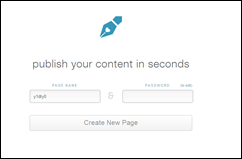 Pen.io is an interesting application for making a quick page with a URL. (Whatever you do in Google Docs will also be given a web URL but this is a much quicker method.)
1. Go to http://www.pen.io/. You will notice a straightforward page with a code in the left box entitled ‘Page name’. The code remains as the URL of your new page.
2. Give your page a password and then click on ‘Create new page’. You’ll be taken to the page where you can start writing.
3. Give your page a title...
Pen.io is an interesting application for making a quick page with a URL. (Whatever you do in Google Docs will also be given a web URL but this is a much quicker method.)
1. Go to http://www.pen.io/. You will notice a straightforward page with a code in the left box entitled ‘Page name’. The code remains as the URL of your new page.
2. Give your page a password and then click on ‘Create new page’. You’ll be taken to the page where you can start writing.
3. Give your page a title...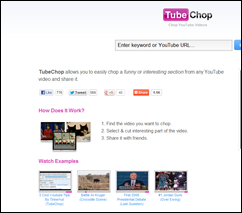 Do you sometimes you wish you could cut a funny or interesting part out of a YouTube video and make a little clip to share with your class? Well, you can with Tube Chop!
1. Open http://www.tubechop.com/
2. Type in the URL of the video you want or the name of the video to chop and press Search. I put in ‘Gotta Share’ for one of my favourite videos. The original video URL for this video is http://www.youtube.com/watch?v=soAk3F0wX9s
3. Set the beginning of the clip and then cli...
Do you sometimes you wish you could cut a funny or interesting part out of a YouTube video and make a little clip to share with your class? Well, you can with Tube Chop!
1. Open http://www.tubechop.com/
2. Type in the URL of the video you want or the name of the video to chop and press Search. I put in ‘Gotta Share’ for one of my favourite videos. The original video URL for this video is http://www.youtube.com/watch?v=soAk3F0wX9s
3. Set the beginning of the clip and then cli... Have you ever found that you are on a website and you want to quickly print the page or a portion of the page? When it prints it is lopsided because it was meant to be on landscape, it is 16 pages long which you didn’t realise plus you have wasted ink with a whole lot if unnecessary pictures and words (not to mention unwanted ads!)? That has happened to me so I was delighted to come across Print Friendly (http://www.printfriendly.com/) .
After opening Print Friendly, the first th...
Have you ever found that you are on a website and you want to quickly print the page or a portion of the page? When it prints it is lopsided because it was meant to be on landscape, it is 16 pages long which you didn’t realise plus you have wasted ink with a whole lot if unnecessary pictures and words (not to mention unwanted ads!)? That has happened to me so I was delighted to come across Print Friendly (http://www.printfriendly.com/) .
After opening Print Friendly, the first th...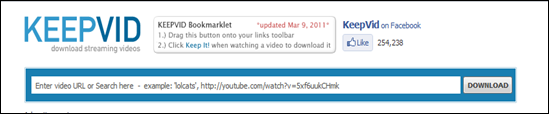 You may run into times when you’re offline and want to watch a YouTube video, or you want to share a YouTube video with your class without going online and waiting for the video to open (a problem in SA with bandwidth). In those cases, you need an actual copy of the video rather than a link to the YouTube site. You can download videos to your computer using a marvelous free online tool called KeepVid (http://keepvid.com). This post aims to give directions on how to do this if you are new to Keep...
 Often when you are watching a presentation and you have computer access you want to make a comment on what the presenter is saying. Twitter is most often used for this. But often, if one wishes the responses to be more private a backchanneling programme like Today’s Meet is used.
What is Today’sMeet?
Today’s meet is a simple way to set up an instant live chat room. It allows participants to ‘backchannel’. This means they can get fully involved by adding their comments and thoughts...
Often when you are watching a presentation and you have computer access you want to make a comment on what the presenter is saying. Twitter is most often used for this. But often, if one wishes the responses to be more private a backchanneling programme like Today’s Meet is used.
What is Today’sMeet?
Today’s meet is a simple way to set up an instant live chat room. It allows participants to ‘backchannel’. This means they can get fully involved by adding their comments and thoughts...























