Audacity is not really a webtool as such but it is a free tool that can be downloaded from the web. It is one of those tools that you simply cannot be without as a teacher! To put it in a nutshell, Audacity is a simple sound editing programme that is used to create MP3s.
What can Audacity be used for?
Audacity can be used across platforms from any operating system which is a big plus. It can be used to record live audio and even edit various sound files. It can export files as MP3s but f...
Submitted by Fiona Beal
Pinterest is one of those social networking programmes that everybody is talking about. It is one of those applications that you know you are going to have to do something about joining at some stage! So, when a friend recently invited me to join Pinterest, I knew the moment of joining and trying out this amazing and popular application had arrived. I made a start by reading Edudemic’s ‘Teacher’s Quick Guide to Pinterest. http://edudemic.com/2012/03/the-...
Recently I was faced with a problem. Some of the Constant Contact newsletter links that I had placed on the blog no longer worked…they had expired. I thought the best thing to do would be to convert the newsletters to PDFs and upload them to Box.net with a link to the blog. But, Constant Contact didn’t seem to supply any way of converting these newsletters to PDF.
Google Chrome extension – Send to Google Docs.
Then I remembered the wonderful free Chrome extensions for Go...
Have you ever tried to open two documents to compare them? You wish you could see immediately what changes you have already made? Comparing, editing and sharing documents is really a way of life for most of us – and Mergely provides a way of doing this easily.
What is Mergely and how does it work?
Mergely is a useful online tool that can help you merge text documents and highlight changes made to existing documents. To do this you open Mergely and paste the original document into the left...
All it took was a set date, a topic, and a hashtag, namely #edchatsa. SA teachers who were on Twitter were then notified that a tweetchat for SA teachers would take place every Monday night from 8:30pm – 9:30pm; and so our regular and popular tweetchat was born! Arthur Preston from Elkanah House put this all into motion. Very soon teachers told other teachers and so the news spread and the numbers are growing steadily. If you would like to know more, Arthur has set up a website http://edchats...
What are Wordclouds?
Wordclouds are such fun to use in the classroom, especially when it comes to vocabulary building. Basically, using a wordcloud application one can transfer words into a cloud of interconnected words that can be arranged and used in different ways. Users can change the layout, color scheme, and fonts. Students love working with wordclouds. Two very popular free wordcloud webtools are Wordle and Tagxeedo, and I am going to explain each below plus give ideas of how ...
I first read about this tool (http://www.qwiki.com/) on the blog of The Educational Technology Guy, who found out about it at a Teacheet in the USA. That is how news spreads! This tool looks really great for students to use to create informative, interactive multimedia presentations very easily.
Qwiki encyclopaedia
I have always known Qwiki as a visual encyclopaedia with over 3 million entries but somehow I can’t find a way of getting there directly unless I add a URL that I already know. From t...
Submitted by Fiona Beal
Have you discovered, like me, that Twitter is a very beneficial way of learning from a PLN (Personal Learning Community)? I find most of my ideas stem from my educational Twitter community. Every day I come across an educational newspaper that has been created by a PLN member using Paper.Li and their Twitter feeds so I decided it was time to try it out for myself.
What is Paper.li?
Curation, as you probably know, is the new buzz word. Paper.li is a free curation tool...
The Internet has a wonderful array of free online recorders that can be very
useful in a classroom. In this post I will mention seven of them and in the Slideshare that follows I have added instructions on how to use them. Most of these are really easy to use, especially as they don’t require one to download any software. Audio recordings are very useful for reading – I have used them in a project where a class shared the books we were reading with another class. Apart from that they c...
Today sees the start of a series called “30 days of Web Tools” where I plan to either focus on a single Web Tool that could interest teachers, or on a collection of Web Tools. Recently I discovered this amazing tool called Storify where you can turn an event into an interesting media story and I wrote a blogpost about it yesterday showing my first attempt – Using Storify.com to summarise a tweetchat from #edchatsa. Today I would like to focus on using Storify to document all the tweets...
SchoolNet South Africa is an incorporated Non Profit Company - Registration 2001/012244/08, NPO Number 030-817
and holds Public Benefit Organisation (PBO) Status, in terms of Section 30 of the Income Tax Act - PBO Number 130003557.

 Audacity is not really a webtool as such but it is a free tool that can be downloaded from the web. It is one of those tools that you simply cannot be without as a teacher! To put it in a nutshell, Audacity is a simple sound editing programme that is used to create MP3s.
What can Audacity be used for?
Audacity can be used across platforms from any operating system which is a big plus. It can be used to record live audio and even edit various sound files. It can export files as MP3s but f...
Audacity is not really a webtool as such but it is a free tool that can be downloaded from the web. It is one of those tools that you simply cannot be without as a teacher! To put it in a nutshell, Audacity is a simple sound editing programme that is used to create MP3s.
What can Audacity be used for?
Audacity can be used across platforms from any operating system which is a big plus. It can be used to record live audio and even edit various sound files. It can export files as MP3s but f... Submitted by Fiona Beal
Pinterest is one of those social networking programmes that everybody is talking about. It is one of those applications that you know you are going to have to do something about joining at some stage! So, when a friend recently invited me to join Pinterest, I knew the moment of joining and trying out this amazing and popular application had arrived. I made a start by reading Edudemic’s ‘Teacher’s Quick Guide to Pinterest. http://edudemic.com/2012/03/the-...
Submitted by Fiona Beal
Pinterest is one of those social networking programmes that everybody is talking about. It is one of those applications that you know you are going to have to do something about joining at some stage! So, when a friend recently invited me to join Pinterest, I knew the moment of joining and trying out this amazing and popular application had arrived. I made a start by reading Edudemic’s ‘Teacher’s Quick Guide to Pinterest. http://edudemic.com/2012/03/the-...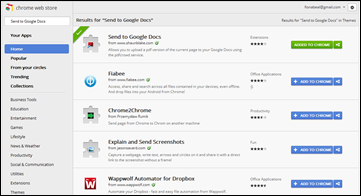 Recently I was faced with a problem. Some of the Constant Contact newsletter links that I had placed on the blog no longer worked…they had expired. I thought the best thing to do would be to convert the newsletters to PDFs and upload them to Box.net with a link to the blog. But, Constant Contact didn’t seem to supply any way of converting these newsletters to PDF.
Google Chrome extension – Send to Google Docs.
Then I remembered the wonderful free Chrome extensions for Go...
Recently I was faced with a problem. Some of the Constant Contact newsletter links that I had placed on the blog no longer worked…they had expired. I thought the best thing to do would be to convert the newsletters to PDFs and upload them to Box.net with a link to the blog. But, Constant Contact didn’t seem to supply any way of converting these newsletters to PDF.
Google Chrome extension – Send to Google Docs.
Then I remembered the wonderful free Chrome extensions for Go... Have you ever tried to open two documents to compare them? You wish you could see immediately what changes you have already made? Comparing, editing and sharing documents is really a way of life for most of us – and Mergely provides a way of doing this easily.
What is Mergely and how does it work?
Mergely is a useful online tool that can help you merge text documents and highlight changes made to existing documents. To do this you open Mergely and paste the original document into the left...
Have you ever tried to open two documents to compare them? You wish you could see immediately what changes you have already made? Comparing, editing and sharing documents is really a way of life for most of us – and Mergely provides a way of doing this easily.
What is Mergely and how does it work?
Mergely is a useful online tool that can help you merge text documents and highlight changes made to existing documents. To do this you open Mergely and paste the original document into the left...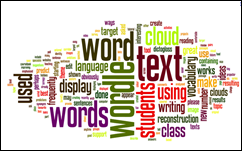 What are Wordclouds?
Wordclouds are such fun to use in the classroom, especially when it comes to vocabulary building. Basically, using a wordcloud application one can transfer words into a cloud of interconnected words that can be arranged and used in different ways. Users can change the layout, color scheme, and fonts. Students love working with wordclouds. Two very popular free wordcloud webtools are Wordle and Tagxeedo, and I am going to explain each below plus give ideas of how ...
What are Wordclouds?
Wordclouds are such fun to use in the classroom, especially when it comes to vocabulary building. Basically, using a wordcloud application one can transfer words into a cloud of interconnected words that can be arranged and used in different ways. Users can change the layout, color scheme, and fonts. Students love working with wordclouds. Two very popular free wordcloud webtools are Wordle and Tagxeedo, and I am going to explain each below plus give ideas of how ... Submitted by Fiona Beal
Have you discovered, like me, that Twitter is a very beneficial way of learning from a PLN (Personal Learning Community)? I find most of my ideas stem from my educational Twitter community. Every day I come across an educational newspaper that has been created by a PLN member using Paper.Li and their Twitter feeds so I decided it was time to try it out for myself.
What is Paper.li?
Curation, as you probably know, is the new buzz word. Paper.li is a free curation tool...
Submitted by Fiona Beal
Have you discovered, like me, that Twitter is a very beneficial way of learning from a PLN (Personal Learning Community)? I find most of my ideas stem from my educational Twitter community. Every day I come across an educational newspaper that has been created by a PLN member using Paper.Li and their Twitter feeds so I decided it was time to try it out for myself.
What is Paper.li?
Curation, as you probably know, is the new buzz word. Paper.li is a free curation tool... The Internet has a wonderful array of free online recorders that can be very
useful in a classroom. In this post I will mention seven of them and in the Slideshare that follows I have added instructions on how to use them. Most of these are really easy to use, especially as they don’t require one to download any software. Audio recordings are very useful for reading – I have used them in a project where a class shared the books we were reading with another class. Apart from that they c...
The Internet has a wonderful array of free online recorders that can be very
useful in a classroom. In this post I will mention seven of them and in the Slideshare that follows I have added instructions on how to use them. Most of these are really easy to use, especially as they don’t require one to download any software. Audio recordings are very useful for reading – I have used them in a project where a class shared the books we were reading with another class. Apart from that they c... Today sees the start of a series called “30 days of Web Tools” where I plan to either focus on a single Web Tool that could interest teachers, or on a collection of Web Tools. Recently I discovered this amazing tool called Storify where you can turn an event into an interesting media story and I wrote a blogpost about it yesterday showing my first attempt – Using Storify.com to summarise a tweetchat from #edchatsa. Today I would like to focus on using Storify to document all the tweets...























