We invite you to two useful short webinars this week.
(1) Even MORE amazing uses of PowerPoint
Last week our webinar was entitled ‘Did you know PowerPoint could do all this?’ where we looked at 10 uses of PowerPoint apart from the normal use of making a presentation. The recording and Slideshare have been posted on this blog. This week we look at Part 2 of the series entitled ‘Even MORE amazing uses of PowerPoint’. Do we realise the potential that lies within this Microsoft product? You’...
Kerpoof as a writing tool was brought to my attention by one of our SchoolNet members, Warren Sparrow from Rondebosch Boys Prep. He has a post about Kerpoof on his blog (https://www.schoolnet.org.za/2013/06/kerpoof.html) and he has even created the first part of his own fairytale.
What is Kerpoof?
This is what it says on the Kerpoof website http://www.kerpoof.com/
“Kerpoof’s multimedia software is used by kids worldwide to create original artwork, animated movies, stories, greeting cards a...
Yesterday Our SchoolNet webinar was entitled ‘Did you know that PowerPoint can do all this?’ (presenter Fiona Beal) Our webinar quota was reached and consequently Adobe Connect excluded several people from participating in the webinar. We apologise for this and we are adding the presentation plus the recording to this post.
The webinar summary
This webinar was the first in a two part series about Microsoft’s PowerPoint. Often one hears the words ‘Death...
We invite you to join our short webinar on Wednesday 12th June (TODAY) 3:30pm.
Background to this week’s webinar
We have two short webinars about Microsoft’s PowerPoint coming up in the next two weeks. Have you discovered all that PowerPoint can do? Often one hears the words ‘Death by PowerPoint’ but in fact this programme has a HUGE variety of wonderful uses that you may not know about. These two webinars will outline these uses.
This week’s webinar
Na...
http://www.videonot.es/
Video notes is a great new tool that enables you to watch a video online and take notes at the same time. This could work really well with information that you want students to explore. This free application works with a number of applications:
How VideoNotes works
Step 1. Open VideoNotes
For the purpose of this post we will explore how it works with YouTube in particular. The way it work with YouTube is that you open VideoNotes (http://www.videonot.es/) and synch...
If you live in Cape Town and want to know more about creating movies in the classroom, or maybe you have ideas to share on how you have done this – please join our 1.5 hours networking & ToolTeach on Thursday afternoon from 4pm – 5:30pm at St Cyprians. This is something new that we would like to introduce to Cape Town teachers.
At a recent Innovation workshop Glenn Bunger from LEAP Schools, Corrine Cornelius from St Cyprians and Fiona Beal from SchoolNet felt they wante...
Submitted by Fiona Beal
With the Internet being so HUGE educators have to become master curators of content. I like this definition from Robin Good (http://goo.gl/j3yVL)
A Learnist Board is a really useful way to curate the information that you need. I love using Pinterest and I love using Scoopit, but what I like about Learnist is that it is only one column and you can set it out in steps of your own choosing.
Take a look around a Grade 1 teacher’s Learnist Boards
Take...
One of the really useful features that blogging platforms, and definitely Blogger, includes is the ability to write a post and then schedule when you would like it to be published. I haven’t used this much in the past, but now, writing about it, I can see a lot of advantages to using this feature. I thought I would give a quick outline here on how to do this.
1. Write your post in the normal manner using the new post template and give the post its title.
2. When you have fi...
Here is another class hard at work creating stories for the African Storybook Project. I have written about the African Storybook Project in a number of posts. The website is hopefully going live in July with stories written by South Africa teachers. If you would like your class to write stories suitable for Grade 3 students across Africa to read, please submit them by 21 June and use the guidelines found in this post. There’s still time to submit a story suitable for a Grade 3 reader for the Afr...
One of the Google features I absolutely love is Google Hangouts. They have incredible potential for the teacher in the classroom, for professional development purposes and for older students to use for collaboration. Google, of course, is always improving its projects and you never know when something is about to improve before your eyes, and this has proved true of Hangouts! Here are three new features that I have noticed.
1. ‘Hangouts chat’ now get an extension on the Chrome toolbar
C...
SchoolNet South Africa is an incorporated Non Profit Company - Registration 2001/012244/08, NPO Number 030-817
and holds Public Benefit Organisation (PBO) Status, in terms of Section 30 of the Income Tax Act - PBO Number 130003557.

 We invite you to two useful short webinars this week.
(1) Even MORE amazing uses of PowerPoint
Last week our webinar was entitled ‘Did you know PowerPoint could do all this?’ where we looked at 10 uses of PowerPoint apart from the normal use of making a presentation. The recording and Slideshare have been posted on this blog. This week we look at Part 2 of the series entitled ‘Even MORE amazing uses of PowerPoint’. Do we realise the potential that lies within this Microsoft product? You’...
We invite you to two useful short webinars this week.
(1) Even MORE amazing uses of PowerPoint
Last week our webinar was entitled ‘Did you know PowerPoint could do all this?’ where we looked at 10 uses of PowerPoint apart from the normal use of making a presentation. The recording and Slideshare have been posted on this blog. This week we look at Part 2 of the series entitled ‘Even MORE amazing uses of PowerPoint’. Do we realise the potential that lies within this Microsoft product? You’...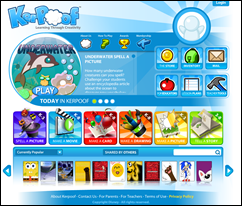 Kerpoof as a writing tool was brought to my attention by one of our SchoolNet members, Warren Sparrow from Rondebosch Boys Prep. He has a post about Kerpoof on his blog (https://www.schoolnet.org.za/2013/06/kerpoof.html) and he has even created the first part of his own fairytale.
What is Kerpoof?
This is what it says on the Kerpoof website http://www.kerpoof.com/
“Kerpoof’s multimedia software is used by kids worldwide to create original artwork, animated movies, stories, greeting cards a...
Kerpoof as a writing tool was brought to my attention by one of our SchoolNet members, Warren Sparrow from Rondebosch Boys Prep. He has a post about Kerpoof on his blog (https://www.schoolnet.org.za/2013/06/kerpoof.html) and he has even created the first part of his own fairytale.
What is Kerpoof?
This is what it says on the Kerpoof website http://www.kerpoof.com/
“Kerpoof’s multimedia software is used by kids worldwide to create original artwork, animated movies, stories, greeting cards a... Yesterday Our SchoolNet webinar was entitled ‘Did you know that PowerPoint can do all this?’ (presenter Fiona Beal) Our webinar quota was reached and consequently Adobe Connect excluded several people from participating in the webinar. We apologise for this and we are adding the presentation plus the recording to this post.
The webinar summary
This webinar was the first in a two part series about Microsoft’s PowerPoint. Often one hears the words ‘Death...
Yesterday Our SchoolNet webinar was entitled ‘Did you know that PowerPoint can do all this?’ (presenter Fiona Beal) Our webinar quota was reached and consequently Adobe Connect excluded several people from participating in the webinar. We apologise for this and we are adding the presentation plus the recording to this post.
The webinar summary
This webinar was the first in a two part series about Microsoft’s PowerPoint. Often one hears the words ‘Death... We invite you to join our short webinar on Wednesday 12th June (TODAY) 3:30pm.
Background to this week’s webinar
We have two short webinars about Microsoft’s PowerPoint coming up in the next two weeks. Have you discovered all that PowerPoint can do? Often one hears the words ‘Death by PowerPoint’ but in fact this programme has a HUGE variety of wonderful uses that you may not know about. These two webinars will outline these uses.
This week’s webinar
Na...
We invite you to join our short webinar on Wednesday 12th June (TODAY) 3:30pm.
Background to this week’s webinar
We have two short webinars about Microsoft’s PowerPoint coming up in the next two weeks. Have you discovered all that PowerPoint can do? Often one hears the words ‘Death by PowerPoint’ but in fact this programme has a HUGE variety of wonderful uses that you may not know about. These two webinars will outline these uses.
This week’s webinar
Na... http://www.videonot.es/
Video notes is a great new tool that enables you to watch a video online and take notes at the same time. This could work really well with information that you want students to explore. This free application works with a number of applications:
How VideoNotes works
Step 1. Open VideoNotes
For the purpose of this post we will explore how it works with YouTube in particular. The way it work with YouTube is that you open VideoNotes (http://www.videonot.es/) and synch...
http://www.videonot.es/
Video notes is a great new tool that enables you to watch a video online and take notes at the same time. This could work really well with information that you want students to explore. This free application works with a number of applications:
How VideoNotes works
Step 1. Open VideoNotes
For the purpose of this post we will explore how it works with YouTube in particular. The way it work with YouTube is that you open VideoNotes (http://www.videonot.es/) and synch... If you live in Cape Town and want to know more about creating movies in the classroom, or maybe you have ideas to share on how you have done this – please join our 1.5 hours networking & ToolTeach on Thursday afternoon from 4pm – 5:30pm at St Cyprians. This is something new that we would like to introduce to Cape Town teachers.
At a recent Innovation workshop Glenn Bunger from LEAP Schools, Corrine Cornelius from St Cyprians and Fiona Beal from SchoolNet felt they wante...
If you live in Cape Town and want to know more about creating movies in the classroom, or maybe you have ideas to share on how you have done this – please join our 1.5 hours networking & ToolTeach on Thursday afternoon from 4pm – 5:30pm at St Cyprians. This is something new that we would like to introduce to Cape Town teachers.
At a recent Innovation workshop Glenn Bunger from LEAP Schools, Corrine Cornelius from St Cyprians and Fiona Beal from SchoolNet felt they wante... Submitted by Fiona Beal
With the Internet being so HUGE educators have to become master curators of content. I like this definition from Robin Good (http://goo.gl/j3yVL)
A Learnist Board is a really useful way to curate the information that you need. I love using Pinterest and I love using Scoopit, but what I like about Learnist is that it is only one column and you can set it out in steps of your own choosing.
Take a look around a Grade 1 teacher’s Learnist Boards
Take...
Submitted by Fiona Beal
With the Internet being so HUGE educators have to become master curators of content. I like this definition from Robin Good (http://goo.gl/j3yVL)
A Learnist Board is a really useful way to curate the information that you need. I love using Pinterest and I love using Scoopit, but what I like about Learnist is that it is only one column and you can set it out in steps of your own choosing.
Take a look around a Grade 1 teacher’s Learnist Boards
Take...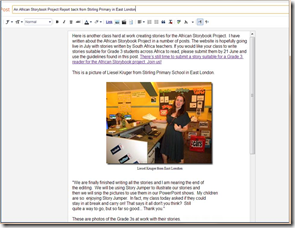 One of the really useful features that blogging platforms, and definitely Blogger, includes is the ability to write a post and then schedule when you would like it to be published. I haven’t used this much in the past, but now, writing about it, I can see a lot of advantages to using this feature. I thought I would give a quick outline here on how to do this.
1. Write your post in the normal manner using the new post template and give the post its title.
2. When you have fi...
One of the really useful features that blogging platforms, and definitely Blogger, includes is the ability to write a post and then schedule when you would like it to be published. I haven’t used this much in the past, but now, writing about it, I can see a lot of advantages to using this feature. I thought I would give a quick outline here on how to do this.
1. Write your post in the normal manner using the new post template and give the post its title.
2. When you have fi...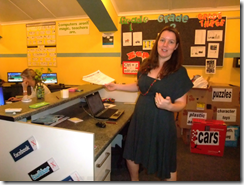 Here is another class hard at work creating stories for the African Storybook Project. I have written about the African Storybook Project in a number of posts. The website is hopefully going live in July with stories written by South Africa teachers. If you would like your class to write stories suitable for Grade 3 students across Africa to read, please submit them by 21 June and use the guidelines found in this post. There’s still time to submit a story suitable for a Grade 3 reader for the Afr...
 One of the Google features I absolutely love is Google Hangouts. They have incredible potential for the teacher in the classroom, for professional development purposes and for older students to use for collaboration. Google, of course, is always improving its projects and you never know when something is about to improve before your eyes, and this has proved true of Hangouts! Here are three new features that I have noticed.
1. ‘Hangouts chat’ now get an extension on the Chrome toolbar
C...
One of the Google features I absolutely love is Google Hangouts. They have incredible potential for the teacher in the classroom, for professional development purposes and for older students to use for collaboration. Google, of course, is always improving its projects and you never know when something is about to improve before your eyes, and this has proved true of Hangouts! Here are three new features that I have noticed.
1. ‘Hangouts chat’ now get an extension on the Chrome toolbar
C...























