It is just day or two before the greatly anticipated Google Teacher Academy, and I thought I would take a look at what some of the other 49 attendees get up to in their daily technology explorations. This podcasting site, TeacherCast http://podcast.teachercast.net/ caught my attention. It is hosted by Jeffrey Bradbury, one of the Google attendees, and it contains many really interesting educational podcasts, blog posts, app reviews and much more! I follow Jeffrey Bradbury o...
Submitted by Fiona Beal
In a few days time (on the 3rd and 4th October) 50+ excited educators from the United States, Mexico, Canada, Colombia, the Czech Republic and South Africa (that’s me) will be descending on New York to attend the Google Teacher Academy New York 2012. These educators have been selected from the hundreds of applications from around the world, so undoubtedly many interested folk will be following the #GTANY Twitter hashtag to get a glimpse of the proceedings.
I love the way ...
Submitted by Fiona Beal
The Google Teacher Academy is not really all that well known in South Africa yet, but in countries like the USA, Britain and Australia, teachers who are interested in integrating the curriculum with technology clamour to attend. Just as Microsoft has its popular products and free tools, Google provides very useful programs such as Blogger blogs, Google Forms, Google Chrome with its huge selection of extensions designed to make browsing a dream, and Google Reader as a place to r...
submitted by Fiona Beal
Which browser do you use? Have you tried Google Chrome? I have three browsers installed on my computer (Chrome, Internet Explorer and Firefox) and I must say that Google Chrome is fast become my firm favourite. Recently I have been exploring free Chrome extensions and have been amazed at what is on offer. These could be very useful for the students we teach.
What is a Chrome extension?
Chrome extensions are extra features and functionality that you can choose to add to your br...
The Internet is full of posts relating to all the things you can do with Google Docs. It is an amazing suite especially when it is used in combination with Google Chrome.
Some of my favourite tips
1. I love the fact that you can upload any document such as a Microsoft PowerPoint and immediately be given an URL to share in whatever way you choose. This means that in a blog, for example, you might want to share a PowerPoint link without having to put it to Slideshare, or you might want to ...
Google Forms is probably one of the most useful and often underutilized Google tools. They can be used for so many different things as I will show you below. They can be embedded into blogs, wikis and websites or can just be stand-a-lones on the web. Each form creates its own spreadsheet that captures and collects the responses quickly and easily.
Here are some of the uses I have discovered:
•You can use them for general surveys
•You can get quick input from others on ...
Have you discovered Google Docs? It is one of the best technology finds available! What I love most about it is its versatility
Just recently I have been exploring Google Docs more fully and here are some of the things I have really enjoyed about using it:
Benefits of using Google Docs
*When you create and or store files in your Google Documents account, those files are available from wherever you go, through any computer with an Internet connection. This means that you don’t have to send f...
I just love all the different features of Slideshare. Last week I explored adding YouTube videos to Slideshare. Today was my day with experimenting with the Slideshare playlist widget. I got the idea from http://web2teachingtools.wikispaces.com/SlideShare. First of all I created my three PowerPoints about creating online forms. I uploaded those to Slideshare:
1) Google forms – so easy to create
This form is definitely my favourite. I can’t believe that Google can give us so m...
I absolutely LOVE this feature of Slideshare where you can embed YouTube videos within Slideshare instead of having a string of them on your blog page. Well, today I got rather ambitious and thought I would gather a collection of the Google tutorials I have been learning from recently…12 videos… to see if adding a large amount of videos would work. It seems that it does work. Well, it was a lengthy affair because I first got all the urls incorrect. You have to use the url that shows under the...
The prestigious Google Academy for 2012 is coming up in London in April and applications had to be in last week. Applicants were given a choice of two topics for creating a video to accompany their online application form, ‘Classroom Innovation’ and ‘Learning and Motivation’. I came across Martin Burnett’s video on Classroom Innovation today – just love it. Don’t we all want classrooms like this? By the way, Martin Burnett was the winner of the Best Educatio...
SchoolNet South Africa is an incorporated Non Profit Company - Registration 2001/012244/08, NPO Number 030-817
and holds Public Benefit Organisation (PBO) Status, in terms of Section 30 of the Income Tax Act - PBO Number 130003557.

 It is just day or two before the greatly anticipated Google Teacher Academy, and I thought I would take a look at what some of the other 49 attendees get up to in their daily technology explorations. This podcasting site, TeacherCast http://podcast.teachercast.net/ caught my attention. It is hosted by Jeffrey Bradbury, one of the Google attendees, and it contains many really interesting educational podcasts, blog posts, app reviews and much more! I follow Jeffrey Bradbury o...
 Submitted by Fiona Beal
In a few days time (on the 3rd and 4th October) 50+ excited educators from the United States, Mexico, Canada, Colombia, the Czech Republic and South Africa (that’s me) will be descending on New York to attend the Google Teacher Academy New York 2012. These educators have been selected from the hundreds of applications from around the world, so undoubtedly many interested folk will be following the #GTANY Twitter hashtag to get a glimpse of the proceedings.
I love the way ...
Submitted by Fiona Beal
In a few days time (on the 3rd and 4th October) 50+ excited educators from the United States, Mexico, Canada, Colombia, the Czech Republic and South Africa (that’s me) will be descending on New York to attend the Google Teacher Academy New York 2012. These educators have been selected from the hundreds of applications from around the world, so undoubtedly many interested folk will be following the #GTANY Twitter hashtag to get a glimpse of the proceedings.
I love the way ... Submitted by Fiona Beal
The Google Teacher Academy is not really all that well known in South Africa yet, but in countries like the USA, Britain and Australia, teachers who are interested in integrating the curriculum with technology clamour to attend. Just as Microsoft has its popular products and free tools, Google provides very useful programs such as Blogger blogs, Google Forms, Google Chrome with its huge selection of extensions designed to make browsing a dream, and Google Reader as a place to r...
Submitted by Fiona Beal
The Google Teacher Academy is not really all that well known in South Africa yet, but in countries like the USA, Britain and Australia, teachers who are interested in integrating the curriculum with technology clamour to attend. Just as Microsoft has its popular products and free tools, Google provides very useful programs such as Blogger blogs, Google Forms, Google Chrome with its huge selection of extensions designed to make browsing a dream, and Google Reader as a place to r... submitted by Fiona Beal
Which browser do you use? Have you tried Google Chrome? I have three browsers installed on my computer (Chrome, Internet Explorer and Firefox) and I must say that Google Chrome is fast become my firm favourite. Recently I have been exploring free Chrome extensions and have been amazed at what is on offer. These could be very useful for the students we teach.
What is a Chrome extension?
Chrome extensions are extra features and functionality that you can choose to add to your br...
submitted by Fiona Beal
Which browser do you use? Have you tried Google Chrome? I have three browsers installed on my computer (Chrome, Internet Explorer and Firefox) and I must say that Google Chrome is fast become my firm favourite. Recently I have been exploring free Chrome extensions and have been amazed at what is on offer. These could be very useful for the students we teach.
What is a Chrome extension?
Chrome extensions are extra features and functionality that you can choose to add to your br... The Internet is full of posts relating to all the things you can do with Google Docs. It is an amazing suite especially when it is used in combination with Google Chrome.
Some of my favourite tips
1. I love the fact that you can upload any document such as a Microsoft PowerPoint and immediately be given an URL to share in whatever way you choose. This means that in a blog, for example, you might want to share a PowerPoint link without having to put it to Slideshare, or you might want to ...
The Internet is full of posts relating to all the things you can do with Google Docs. It is an amazing suite especially when it is used in combination with Google Chrome.
Some of my favourite tips
1. I love the fact that you can upload any document such as a Microsoft PowerPoint and immediately be given an URL to share in whatever way you choose. This means that in a blog, for example, you might want to share a PowerPoint link without having to put it to Slideshare, or you might want to ... Google Forms is probably one of the most useful and often underutilized Google tools. They can be used for so many different things as I will show you below. They can be embedded into blogs, wikis and websites or can just be stand-a-lones on the web. Each form creates its own spreadsheet that captures and collects the responses quickly and easily.
Here are some of the uses I have discovered:
•You can use them for general surveys
•You can get quick input from others on ...
Google Forms is probably one of the most useful and often underutilized Google tools. They can be used for so many different things as I will show you below. They can be embedded into blogs, wikis and websites or can just be stand-a-lones on the web. Each form creates its own spreadsheet that captures and collects the responses quickly and easily.
Here are some of the uses I have discovered:
•You can use them for general surveys
•You can get quick input from others on ... Have you discovered Google Docs? It is one of the best technology finds available! What I love most about it is its versatility
Just recently I have been exploring Google Docs more fully and here are some of the things I have really enjoyed about using it:
Benefits of using Google Docs
*When you create and or store files in your Google Documents account, those files are available from wherever you go, through any computer with an Internet connection. This means that you don’t have to send f...
Have you discovered Google Docs? It is one of the best technology finds available! What I love most about it is its versatility
Just recently I have been exploring Google Docs more fully and here are some of the things I have really enjoyed about using it:
Benefits of using Google Docs
*When you create and or store files in your Google Documents account, those files are available from wherever you go, through any computer with an Internet connection. This means that you don’t have to send f...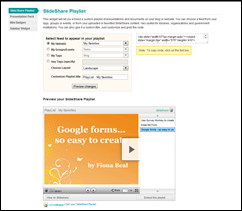 I just love all the different features of Slideshare. Last week I explored adding YouTube videos to Slideshare. Today was my day with experimenting with the Slideshare playlist widget. I got the idea from http://web2teachingtools.wikispaces.com/SlideShare. First of all I created my three PowerPoints about creating online forms. I uploaded those to Slideshare:
1) Google forms – so easy to create
This form is definitely my favourite. I can’t believe that Google can give us so m...
I just love all the different features of Slideshare. Last week I explored adding YouTube videos to Slideshare. Today was my day with experimenting with the Slideshare playlist widget. I got the idea from http://web2teachingtools.wikispaces.com/SlideShare. First of all I created my three PowerPoints about creating online forms. I uploaded those to Slideshare:
1) Google forms – so easy to create
This form is definitely my favourite. I can’t believe that Google can give us so m... I absolutely LOVE this feature of Slideshare where you can embed YouTube videos within Slideshare instead of having a string of them on your blog page. Well, today I got rather ambitious and thought I would gather a collection of the Google tutorials I have been learning from recently…12 videos… to see if adding a large amount of videos would work. It seems that it does work. Well, it was a lengthy affair because I first got all the urls incorrect. You have to use the url that shows under the...























